
What does this mean? My personal website both sends and accepts Webmentions, a platform independent “at mention” or @mention, including those from the fantastic, free service brid.gy which sends replies/comments, likes, reposts, and mentions to my site from silo services like Facebook, Twitter, Instagram, Google+, and even Flickr.
As I’ve long known, and as someone noted at least once on my site, some of these likes, replies, and mentions, which provide some interesting social interaction and social proof of a post’s interest, don’t always contribute to the actual value of the conversation. Now with this wonderful facepiling UI-feature, I’m able to concatenate these types of interactions into a smaller and more concentrated section at the bottom of a post’s comments section, so they’re still logged and available, but now they just aren’t as distracting to the rest of the conversation.
Compare the before and after:
Before
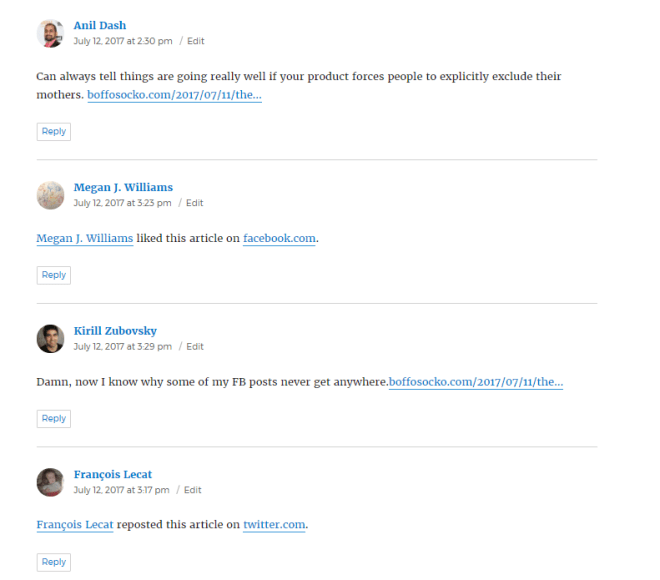

After

A Prime Example
In particular, this functionality can best bee seen on my article The Facebook Algorithm Mom Problem, which has over 400 such interactions which spanned pages and pages worth of likes, reposts, and mentions. Many of my posts only get a handful of these types of interactions, but this particular post back in July was overwhelmed with them when it floated to the top of Hacker News and nearly crippled my website. Without the facepile functionality, the comments section of this post was untenably unreadable and unusable. Now, with facepiles enabled, the comments are more quickly read and more useful to those who are interested in reading them while still keeping the intent.
Implementing
For those who have already begun Indiewebifying their WordPress sites with plugins like Webmention and Semantic Linkbacks, the most recent 3.5.0 update to Semantic Linkbacks has the functionality enabled by default. (Otherwise you can go to your administrative dashboard and click on the checkbox next to “Automatically embed facepile” located under Settings » Discussion).

As a caveat, there’s a known bug for those who are using JetPack to “Let readers use WordPress.com, Twitter, Facebook, or Google+ accounts to comment”. If the facepiles don’t show up on your site, just go to your JetPack settings (at yoursite.com/wp-admin/admin.php?page=jetpack#/discussion) and disable this feature. Hopefully, the JetPack team will have it fixed shortly.
If you haven’t begun using IndieWeb principles on your WordPress website, you might consider starting with my article An Introduction to the IndieWeb, which includes some motivation as well as some great resources for getting started.
Nota bene: I know many in the WordPress community are using the excellent theme Independent Publisher, which already separates out likes, mentions, etc. (though without the actual “facepiles”), so I’m not sure if/how this functionality may work in conjunction with it. If you know, please drop me a note.
Hopefully most WordPress themes will support it natively without any modifications, but users are encouraged to file issues on the plugin if they run across problems.
Using another platform?
I’m not immediately aware of many other CMSes or services that have this enabled easily out of the box, but I do know that Drew McLellan enabled it (along with Webmentions) in the Perch CMS back in July. Others who I’ve seen enabling this type of functionality are documented on the IndieWeb wiki in addition to Marty McGuire and Jeremy Keith, who has a modified version, somewhat like Independent Publisher’s, on his website.
There are certainly many in the IndieWeb community who can help you with this idea (and many others) in the IndieWeb’s online chat.
Give it a spin
Now that it’s enabled, if you’re reading it on my website, you can click on any of the syndicated copies listed below and like, retweet/repost, or mention this article in those social media platforms and your mention will get sent back to my post to be displayed almost as it would be on many of those platforms. Naturally comments or questions are encouraged to further the ongoing conversation, which should now also be much easier to read and interact with.
Thanks again to everyone in the IndieWeb community who are continually hacking away to allow more people to more easily own and control their content while still easily interacting with people on the internet.
UPDATE
Turning mentions into comments for native display
Following Aaron Davis’ comment, I thought I’d add a few more thoughts for those who have begun facepiling their likes, mentions, bookmarks, etc. As he indicates, it’s sometimes useful to call out a particular mention, a special like, or you might want to highlight one among the thousands for a particular reason. This is a feature that many are likely to want occasionally and code for it may be added in the future, but until then, one is left in the lurch a bit. Fortunately, as with all things IndieWeb, part of the point is having more control over your site to be able to do anything you’d like to it. So for those without the ability to write the requisite code to create a pull request against the Webmention or Semantic Linkbacks plugins (they’re more than welcome), here are a few quick cheats for converting that occasional (facepiled or not) webmention into a full comment within your WordPress site’s comment section.
Pro tip: This also works (even if you’re not using facepiles) to convert a basic mention into something that looks more like a native comment. It’s also useful when you’ve received a mention that you’d prefer to treat as a reply, but which wasn’t marked up as a reply by the sending site.
I’ll use an example from the Facebook Algorithm Mom Problem post referenced above. On that post, I’d received a webmention via Twitter from Anil Dash, a blogger and advocate for more humane, inclusive and ethical technology, with some commentary about usability. Here is his original tweet:
Can always tell things are going really well if your product forces people to explicitly exclude their mothers. https://t.co/lh41jVIU0E
— Anil Dash (@anildash) July 12, 2017
That webmention is now hidden behind an avatar and not as likely to be seen by more casual readers. I’d like to change it from being hidden behind his avatar in that long mention list and highlight it a bit to make it appear as a comment in the full comments section.

Steps to convert a mention to a comment
Caution: I recommend reading through all the steps before attempting this. You’ll be modifying your WordPress database manually, so please be careful so you don’t accidentally destroy your site. When doing things like this, it’s always a good idea to make a back up of your database just in case.
- Search for the particular comment you want to change in the WordPress Admin UI.
- Hover over the date in the “Submitted On” column to find the comment ID number in the URL, in this case it’s
http://boffosocko.com/2017/07/11/the-facebook-algorithm-mom-problem/#comment-35281. Make a note of the comment ID: 35281. - Open up the mySQL database for your WordPress install (I’m using phpMyAdmin) to view the data for your site.
- Go to the
wp_commentstable in the database. (Yours may be slightly different depending on how your site was set up, but it should contain the word “comments”.) - Use the search functionality for your table and input your comment ID number into the field for
comment_ID. - Now delete the word “webmention” from the
comment_typefield for the particular comment. This field should now be empty. - You should now be able to view your post (be sure to clear your cache if necessary) and see the mention you received displayed as a native comment instead of a mention. It should automatically include the text of the particular mention you needed.

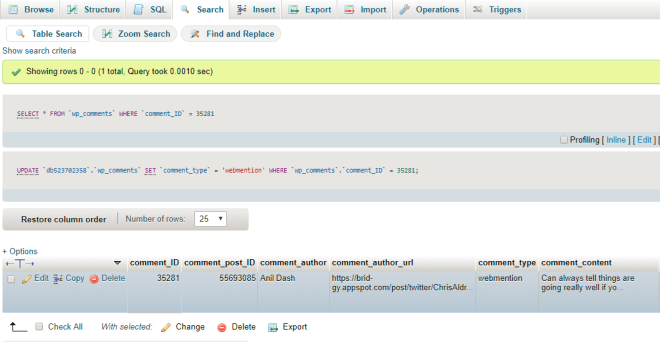

If you need to convert a large number of mentions into comments, you may be better off searching for the particular post’s post_ID in the comments table and changing multiple comment_type fields at once. Be careful doing this in bulk–you may wish to do a database back up before making any changes to be on the safe side.










I’d be interested to know when the Jetpack team fixes this as there’s a good chance the update notice won’t mention the Semantic Linkback app.
Bill, I’m following the issue and will ping you if/when they fix the issue.
I’ve been part of the IndieWeb for over 10 years now and didn’t even realize it. Bummer about the JetPack issue although it turns out the “Let readers use WordPress.com, Twitter, Facebook, or Google+ accounts to comment” was already disabled.
This works well.
@danielbrinneman check this out: boffosocko.com/2017/10/06/usi…
New WordPress tool to display Likes/Faves and still see Comments.
Thanks for the update Chris. I hated how my comments became long lists of ‘likes’ so up until now I have only accepted webmentions that actually add to the conversation. Facepiles really changes that. My only bugbear is that I like facepiles for likes etc however there are times when I want the text, especially when the mention adds something. No one is going to click through and that is not ideal anyway.
Aaron, there are times when simple mentions do add to the conversation. Typically they include the text of the mention but the meta data hides them because of the way things are set to display. In those cases I often go into my database and manually change them to replies so they display the way I want them to. I’ll try to document the procedure so others can do the same, but there has been talk of adding code to make it easier to change directly within the amin interface. I don’t think it was a huge priority at the moment though.
Aaron, I’ve updated the post to add some details for making your changes manually if necessary.
http://boffosocko.com/2017/10/06/using-facepiles-in-comments-for-wordpress-with-webmentions-and-semantic-linkbacks/#Turning+mentions+into+comments
Syndicated copies:
Thank you so much Chris. That is really helpful. I am going to be honest, I have never ventured that far into the backend, but am now more willing. However, I will definitely backup before doing so.
Turning Webmentions into comments for native display on #WordPress#facepile #IndieWebhttp://boffosocko.com/2017/10/06/using-facepiles-in-comments-for-wordpress-with-webmentions-and-semantic-linkbacks/#Turning+mentions+into+comments
Syndicated copies:
@mrkrndvs Aaron, I’ve updated the post to add some details for making your changes manually if necessary.boffosocko.com/2017/10/06/usi…
@mrkrndvs Aaron, I’ve updated the post to add some details for making your changes manually if necessary.boffosocko.com/2017/10/06/usi…
tag:twitter.com,2013:918557867975827462_favorited_by_3983451
  Scott Kingery

TechLifeWeb
https://twitter.com/ChrisAldrich/status/918557867975827462#favorited-by-3983451
tag:twitter.com,2013:918557867975827462_favorited_by_14587524
  Jason Green

jasongreen
https://twitter.com/ChrisAldrich/status/918557867975827462#favorited-by-14587524
Pingbacks: hiding in plain sight by Ian Guest (Marginal Notes)
I’m finding your short study and thoughts on pingbacks while I was thinking about Webmentions (and a particular issue that Aaron Davis was having with them) after having spent a chunk of the day remotely following the Dodging the Memory Hole 2017 conference at the Internet Archive in San Francisco.
It’s made me realize that one of the bigger values of the iteration that Webmentions has over its predecessor pingbacks and trackbacks is that at least a snapshot of the content has captured on the receiving site. As you’ve noted that while the receiving site has the scant data from the pingback, there’s not much to look at in general and even less when the sending site has disappeared from the web. In the case of Webmentions, even if the sending site has disappeared from the web, the receiving site can still potentially display more of that missing content if it wishes. Within the WordPress ecosystem simple mentions only show the indication that the article was mentioned, but hiding within the actual database on the back end is a copy of the post itself. With a few quick changes to make the “mention” into a “reply” the content of the original post can be quickly uncovered/recovered. (I do wonder a bit if you cross-referenced the Internet Archive or other sources in your search to attempt to recover those lost links.)
I will admit that I recall the Webmention spec allowing a site to modify and/or update its replies/webmentions, but in practice I’m not sure how many sites actually implement this functionality, so from an archiveal standpoint it’s probably pretty solid/stable at the moment.
Separately, I also find myself looking at your small example and how you’ve expanded it out a level or two within your network to see how it spread. This reminds me of Ryan Barrrett’s work from earlier this year on the IndieWeb network in creating the Indie Map tool which he used to show the interconnections between over three thousand people (or their websites) using links like Webmentions. Depending on your broader study, it might make an interesting example to look at and/or perhaps some code to extend?
With particular regard to your paragraph under “Wait! Aren’t you researching Twitter?” I thought I’d point you to a hybrid approach of melding some of Twitter and older/traditional blogs together. I personally post everything to my own website first and syndicate it to Twitter and then backfeed all of the replies, comments, and reactions via Brid.gy using webmentions. While there aren’t a lot of users on the internet doing something like this at the moment, it may provide a very different microcosm for you to take a look at. I’ve even patched together a means to allow people to @mention me on Twitter that sends the data to my personal website as a means of communication.
After a bit of poking around, I was also glad to find a fellow netizen who is also consciously using their website as a commonplace book of sorts.
Syndicated copies to:
Author: Chris Aldrich
I'm a biomedical and electrical engineer with interests in information theory, complexity, evolution, genetics, signal processing, theoretical mathematics, and big history.
I’m also a talent manager-producer-publisher in the entertainment industry with expertise in representation, distribution, finance, production, content delivery, and new media.
View all posts by Chris Aldrich
Replied to Pingbacks: hiding in plain sight by Ian Guest (Marginal Notes)
I’m finding your short study and thoughts on pingbacks while I was thinking about Webmentions (and a particular issue that Aaron Davis was having with them) after having spent a chunk of the day remotely following the Dodging the Memory Hole 2017 conference at the Internet Archive in San Francisco.
It’s made me realize that one of the bigger values of the iteration that Webmentions has over its predecessor pingbacks and trackbacks is that at least a snapshot of the content has captured on the receiving site. As you’ve noted that while the receiving site has the scant data from the pingback, there’s not much to look at in general and even less when the sending site has disappeared from the web. In the case of Webmentions, even if the sending site has disappeared from the web, the receiving site can still potentially display more of that missing content if it wishes. Within the WordPress ecosystem simple mentions only show the indication that the article was mentioned, but hiding within the actual database on the back end is a copy of the post itself. With a few quick changes to make the “mention” into a “reply” the content of the original post can be quickly uncovered/recovered. (I do wonder a bit if you cross-referenced the Internet Archive or other sources in your search to attempt to recover those lost links.)
I will admit that I recall the Webmention spec allowing a site to modify and/or update its replies/webmentions, but in practice I’m not sure how many sites actually implement this functionality, so from an archiveal standpoint it’s probably pretty solid/stable at the moment.
Separately, I also find myself looking at your small example and how you’ve expanded it out a level or two within your network to see how it spread. This reminds me of Ryan Barrrett’s work from earlier this year on the IndieWeb network in creating the Indie Map tool which he used to show the interconnections between over three thousand people (or their websites) using links like Webmentions. Depending on your broader study, it might make an interesting example to look at and/or perhaps some code to extend?
With particular regard to your paragraph under “Wait! Aren’t you researching Twitter?” I thought I’d point you to a hybrid approach of melding some of Twitter and older/traditional blogs together. I personally post everything to my own website first and syndicate it to Twitter and then backfeed all of the replies, comments, and reactions via Brid.gy using webmentions. While there aren’t a lot of users on the internet doing something like this at the moment, it may provide a very different microcosm for you to take a look at. I’ve even patched together a means to allow people to @mention me on Twitter that sends the data to my personal website as a means of communication.
After a bit of poking around, I was also glad to find a fellow netizen who is also consciously using their website as a commonplace book of sorts.
Syndicated copies to:
Syndicated copies:
I’m finding your short study and thoughts on pingbacks while I was thinking about Webmentions (and a particular issue that Aaron Davis was having with them) after having spent a chunk of the day remotely following the Dodging the Memory Hole 2017 conference at the Internet Archive in San Francisco.
It’s made me realize that one of the bigger values of the iteration that Webmentions has over its predecessor pingbacks and trackbacks is that at least a snapshot of the content has captured on the receiving site. As you’ve noted that while the receiving site has the scant data from the pingback, there’s not much to look at in general and even less when the sending site has disappeared from the web. In the case of Webmentions, even if the sending site has disappeared from the web, the receiving site can still potentially display more of that missing content if it wishes. Within the WordPress ecosystem simple mentions only show the indication that the article was mentioned, but hiding within the actual database on the back end is a copy of the post itself. With a few quick changes to make the “mention” into a “reply” the content of the original post can be quickly uncovered/recovered. (I do wonder a bit if you cross-referenced the Internet Archive or other sources in your search to attempt to recover those lost links.)
I will admit that I recall the Webmention spec allowing a site to modify and/or update its replies/webmentions, but in practice I’m not sure how many sites actually implement this functionality, so from an archiveal standpoint it’s probably pretty solid/stable at the moment.
Separately, I also find myself looking at your small example and how you’ve expanded it out a level or two within your network to see how it spread. This reminds me of Ryan Barrrett’s work from earlier this year on the IndieWeb network in creating the Indie Map tool which he used to show the interconnections between over three thousand people (or their websites) using links like Webmentions. Depending on your broader study, it might make an interesting example to look at and/or perhaps some code to extend?
With particular regard to your paragraph under “Wait! Aren’t you researching Twitter?” I thought I’d point you to a hybrid approach of melding some of Twitter and older/traditional blogs together. I personally post everything to my own website first and syndicate it to Twitter and then backfeed all of the replies, comments, and reactions via Brid.gy using webmentions. While there aren’t a lot of users on the internet doing something like this at the moment, it may provide a very different microcosm for you to take a look at. I’ve even patched together a means to allow people to @mention me on Twitter that sends the data to my personal website as a means of communication.
After a bit of poking around, I was also glad to find a fellow netizen who is also consciously using their website as a commonplace book of sorts.
Syndicated copies:
In a backchannel conversation, I was asked about what is involved in setting up webmentions. I responded there, but thought that I would keep a note of it here:
Hmmm, my suspicions to why my webmentions/linkbacks are not getting through is that they are being flagged as spam by spam filters. On the WordPress Webmention Plugin page, there is some code that you can add to functions.php file to prevent this:
function unspam_webmentions($approved, $commentdata) {
return $commentdata[‘comment_type’] == ‘webmention’ ? 1 : $approved;
}
add_filter(‘pre_comment_approved’, ‘unspam_webmentions’, ’99’, 2);
There is also More on Webmentions on the IndieWeb.org, but really it is a part of the IndieWeb plugin.
I was never really interested in endless mentions under my posts until facepiles.
In the end, it is a very technical solution at this point in time, but I feel it is worth persevering with. Like Chris Aldrich, I am not sold on Mastodon as the supposed solution to the social media and the web, but feel that there needs to be something better than FB and their shadow profiles.
Here is to hoping.
I’ve been meaning to write regular updates to highlight some of the useful changes in the functionality of the IndieWeb suite of WordPress plugins, but never gotten around to it. There’s been a few really interesting ones lately, so I thought I’d start. Observant watchers who read through either the code or even the scant change logs before they update their code may catch some of these features, but sometimes interesting tidbits can slip by the most vigilant. Here are some interesting recent ones:
Display of Reads, Listens, and Watches in comments sections
David Shanske’s excellent Post Kinds Plugin allows one to post what they’re reading, listening to, or watching in simple IndieWeb fashion. (Examples of these on my site: read posts, listen posts, watch posts.) These posts types automatically include the appropriate microformats classes so the user doesn’t need to bother doing them manually. For a long time when replying to another’s site, bookmarking it, or even mentioning it when also using the Webmentions plugin would send the site a Webmention that would generally cause it to show up as a native comment, bookmark or mention. With an update late last year, from within the
Discussionsettings in WordPress, one could set toggles so that many of these webmentions could be displayed as facepiles. Other broadly unsupported post types would typically default to a simple mention.Recently David Shanske and I started a podcast, and he thought it would be useful if his site could accept listen posts and show them visually within his comments section just like these replies, bookmarks, and mentions. Thus over the past month he’s added code to the Semantic Linkbacks Plugin to add the functionality for these types of posts to properly render showing facepiles for listens, reads, and watches.
This is what webmentions of listen posts look like on his site in his comments section:
User Interface example of how listen posts on David Shanske’s podcast appear on his site
What’s happening
Listen (or scrobble) posts can send webmentions (or notifications) to the original content potentially with the experimental
listen-ofmicroformat. In the case of scrobbles of podcasts, these webmentions could be displayed as “Listens” which would provide the canonical copy of the podcast some indicator of its popularity and actual audience. It is tremendously difficult to obtain data on the actual number of listens within most of the podcast community and typically a fraction of the number of downloads must be used as an indicator of the actual reach. Being able to display listens could potentially be a boon to the podcasting market, particularly with respect to advertising as this type of open social web functionality spreads.Similarly read posts with the
read-ofmicroformat and watches withwatch-ofwill be accepted and show up within the comments section. Like the previous types, they can be set to display as facepiles within the user interface.From the Discussion options settings page (typically at: /wp-admin/options-discussion.php#semantic_linkbacks) one can choose the mention types one wants to have appear as facepiles within their comments section.
Knowing that this read functionality would be available, this week I helped ColoradoBoulevard.net set up their site to be able to accept and display reads of their articles. Here’s an example from their site:
The display of a read post on ColoradoBoulevard.net
I haven’t yet seen one for watches in the wild yet, but maybe you’ll be either the first to send or receive one?
The microformats on these posts is generally considered to be experimental, but with the ~500+ users of this suite of tools as well as others who are already using them on other sites, they’ve now taken a dramatic step into the open internet and more widespread use and potential official adoption.
Editable Webmention Types and Avatars
Webmention Types
Just yesterday, I spent a few minutes in the IndieWeb chat helping someone to laboriously delve into their mySQL databaset and find a particular snippet of data so they could manually change a received webmention from being a simple
mentionto being areplyso that it would display as a native comment on their website. I’ve often done this to take what sometimes seem like simple mentions and change them to replies to reveal the richer content they often contain for the broader conversation. Sadly the process is boring, laborious, and fraught with potential ways to mess things up.As of this weekend, this process is no longer necessary. One can now go to the admin interface for their comments and webmentions (found at the path
/wp-admin/edit-comments.php), click oneditfor the particular comment they’re changing and then scroll down to reveal a droplist interface to be able to manually change the webmention type.Samantic Linkbacks Data metabox within the comment editing interface on WordPress. One can use the dropbox to change the webmention type as well as manually update the commenter’s avatar.
As another example of a use for this functionality, perhaps you’ve received a listen mention on one of your podcast episodes that has a lot of useful notes or commentary germane to your episode? Instead of hiding it as a simple listen, why not change the type to
replyto allow a richer conversation around your content? After all, with a reasonable reply it will be implicit that the commenter actually listened to the episode, right?Avatars
Because there is currently no functionality in WordPress for saving or caching the avatars of commenters via webmention, when users change their profile images on siloed services like Facebook, Twitter, et al. the link to their old avatars quits working and they were displaying blank spaces. This is an unfortunate form of linkrot, but one that can become more visually apparent over time.
Likes and Reposts concatenated on my site now after converting them into facepiles. They still give the social “proof” and indicate the interaction, but don’t interfere in the conversation now–especially when there are hundreds of them.
As one can see in the image for the commenting edit box above, the field for the
Avataris now editable. This means one can update out-of-date or blank avatars. One now also has the ability to moderate/edit or easily remove/switch avatars if users are sending inappropriate photos for one’s site’s audience.Syndicated copies to:
Flipboard icon
Tumblr icon
WordPress
Twitter icon
Mastodon icon
Google+ icon
Syndicated copies:
I’ve been meaning to write regular updates to highlight some of the useful changes in the functionality of the IndieWeb suite of WordPress plugins, but never gotten around to it. There’s been a few really interesting ones lately, so I thought I’d start. Observant watchers who read through either the code or even the scant change logs before they update their code may catch some of these features, but sometimes interesting tidbits can slip by the most vigilant. Here are some interesting recent ones:
Display of Reads, Listens, and Watches in comments sections
David Shanske’s excellent Post Kinds Plugin allows one to post what they’re reading, listening to, or watching in simple IndieWeb fashion. (Examples of these on my site: read posts, listen posts, watch posts.) These posts types automatically include the appropriate microformats classes so the user doesn’t need to bother doing them manually. For a long time when replying to another’s site, bookmarking it, or even mentioning it when also using the Webmentions plugin would send the site a Webmention that would generally cause it to show up as a native comment, bookmark or mention. With an update late last year, from within the
Discussionsettings in WordPress, one could set toggles so that many of these webmentions could be displayed as facepiles. Other broadly unsupported post types would typically default to a simple mention.Recently David Shanske and I started a podcast, and he thought it would be useful if his site could accept listen posts and show them visually within his comments section just like these replies, bookmarks, and mentions. Thus over the past month he’s added code to the Semantic Linkbacks Plugin to add the functionality for these types of posts to properly render showing facepiles for listens, reads, and watches.
This is what webmentions of listen posts look like on his site in his comments section:
User Interface example of how listen posts on David Shanske’s podcast appear on his site
What’s happening
Listen (or scrobble) posts can send webmentions (or notifications) to the original content potentially with the experimental
listen-ofmicroformat. In the case of scrobbles of podcasts, these webmentions could be displayed as “Listens” which would provide the canonical copy of the podcast some indicator of its popularity and actual audience. It is tremendously difficult to obtain data on the actual number of listens within most of the podcast community and typically a fraction of the number of downloads must be used as an indicator of the actual reach. Being able to display listens could potentially be a boon to the podcasting market, particularly with respect to advertising as this type of open social web functionality spreads.Similarly read posts with the
read-ofmicroformat and watches withwatch-ofwill be accepted and show up within the comments section. Like the previous types, they can be set to display as facepiles within the user interface.From the Discussion options settings page (typically at: /wp-admin/options-discussion.php#semantic_linkbacks) one can choose the mention types one wants to have appear as facepiles within their comments section.
Knowing that this read functionality would be available, this week I helped ColoradoBoulevard.net set up their site to be able to accept and display reads of their articles. Here’s an example from their site:
The display of a read post on ColoradoBoulevard.net
I haven’t yet seen one for watches in the wild yet, but maybe you’ll be either the first to send or receive one?
The microformats on these posts is generally considered to be experimental, but with the ~500+ users of this suite of tools as well as others who are already using them on other sites, they’ve now taken a dramatic step into the open internet and more widespread use and potential official adoption.
Editable Webmention Types and Avatars
Webmention Types
Just yesterday, I spent a few minutes in the IndieWeb chat helping someone to laboriously delve into their mySQL databaset and find a particular snippet of data so they could manually change a received webmention from being a simple
mentionto being areplyso that it would display as a native comment on their website. I’ve often done this to take what sometimes seem like simple mentions and change them to replies to reveal the richer content they often contain for the broader conversation. Sadly the process is boring, laborious, and fraught with potential ways to mess things up.As of this weekend, this process is no longer necessary. One can now go to the admin interface for their comments and webmentions (found at the path
/wp-admin/edit-comments.php), click oneditfor the particular comment they’re changing and then scroll down to reveal a droplist interface to be able to manually change the webmention type.Samantic Linkbacks Data metabox within the comment editing interface on WordPress. One can use the dropbox to change the webmention type as well as manually update the commenter’s avatar.
As another example of a use for this functionality, perhaps you’ve received a listen mention on one of your podcast episodes that has a lot of useful notes or commentary germane to your episode? Instead of hiding it as a simple listen, why not change the type to
replyto allow a richer conversation around your content? After all, with a reasonable reply it will be implicit that the commenter actually listened to the episode, right?Avatars
Because there is currently no functionality in WordPress for saving or caching the avatars of commenters via webmention, when users change their profile images on siloed services like Facebook, Twitter, et al. the link to their old avatars quits working and they were displaying blank spaces. This is an unfortunate form of linkrot, but one that can become more visually apparent over time.
Likes and Reposts concatenated on my site now after converting them into facepiles. They still give the social “proof” and indicate the interaction, but don’t interfere in the conversation now–especially when there are hundreds of them.
As one can see in the image for the commenting edit box above, the field for the
Avataris now editable. This means one can update out-of-date or blank avatars. One now also has the ability to moderate/edit or easily remove/switch avatars if users are sending inappropriate photos for one’s site’s audience.Syndicated copies to:
Flipboard icon
Tumblr icon
WordPress
Twitter icon
Mastodon icon
Google+ icon
Syndicated copies:
I feel that I have done something wrong, but my facepiles have been turned into names.
I thought this was somehow related to GDPR and have finally gotten to lifting the hood, but there is nothing there? Have I missed something? Is it being broken by something else? I have ticked the various types in Settings>Discussion. Disabled Jetpacked based comments.
I am wondering if something occured by moving webmentions out of Discussion
And into IndieWeb plugin settings?
I am sure that it is just me.
Aaron, I’m guessing you got it fixed already, but for the tape, this does seem to be a default settings issue which has been fixed in a PR which hasn’t yet pushed. To fix things temporarily until it updates, one could go to the Webmention settings page and simply save it so that the Webmentions plugin will save the default settings to show the avatars.
Syndicated copies:
Yes, sorry Chris, I should have said. Thank you.
No worries. I’m pretty sure I saw you see it in the IRC chat, but wanted to make sure it actually worked.
I also have a feeling that 90% of sending that reply was as a test of something I tweaked on my side. 😉
Webmention is a web standard for mentions and conversations across the web, a powerful building block that is used for a growing federated network of comments, likes, reposts, and other rich interactions across the decentralized social web.
I’ve been working for awhile on trying to make my blog the central hub of my online presence, even on social media, taking a #POSSE approach. I’ve recently setup Bridgy in order to bring back the conversation on other platforms back to my site. One issue that I’ve found is that the #Facepile setup of #Webmentions is getting blown away when using JetPack comments. This issue was reported on GitHub like 3 years ago, and even mentioned by Chris Aldrich on his excellent blog post about using WordPress with the #IndieWeb.
I’m going to need to do some digging over the next week to see about working on a fix for this. One niceShare this:Click to share on Facebook (Opens in new window)Click to share on Twitter (Opens in new window)Click to share on Tumblr (Opens in new window)Click to share on LinkedIn (Opens in new window)Click to email this to a friend (Opens in new window)Like this:Like Loading…
Webmention is an open web standard (W3C Recommendation) for conversations and interactions across the web, a powerful building block used for a growing distributed network of peer-to-peer comments, likes, reposts, and other responses across the web.
This Article was mentioned on timnolte.com
Syndicated copies:
This Article was mentioned on timnolte.com
Syndicated copies: