For the Fall 2022 offering Dr. Michael Miller is offering a mathematics course on Theory and Applications of Continued Fractions at UCLA on Tuesday nights through December 6th. We started the first class last night, but there have been issues with the course listing on UCLA Extension, so I thought I’d post here for any who may have missed it. (If you have issues registering, which some have, call the Extension office to register via phone.)
For almost 300 years, continued fractions—that is, numbers representable as the sum of an integer and a fraction whose denominator is itself such a sum—have fascinated mathematicians with both their remarkable properties and their myriad applications in such fields as number theory, differential equations, and computer algorithms. They have been applied to piano tuning, baseball batting averages, rational tangles, paper folding, and plant growth … the list goes on. This course is a rigorous introduction to the theory and mathematical applications of continued fractions. Topics to be discussed include quadratic irrationals, approximation of real numbers, Liouville’s Theorem, linear recurrence relations and Pell’s equation, Hurwitz’ Theorem, measure theory, and Ramanujan identities.
Mike is recommending the Continued Fractions text by Aleksandr Yakovlevich Khinchin. I found a downloadable digital copy of the 1964 edition (which should be ostensibly the same as the current Dover edition and all the other English editions) at the Internet Archive at Based on my notes, it looks like he’s following the Khinchin presentation fairly closely so far.
If you’re interested, do join us on Tuesday nights this fall. (We’ve already discovered that going 11 for 37 is the smallest number of at bats that will produce a 0.297 batting average.)
So you’ve taken the plunge and purchased an old school library card catalog, or maybe you want to but haven’t hit critical mass of cards to justify the purchase yet? Certainly you’ve found the traditional index card supplies still available at every office supply store on the planet, but did you know there’s still at least one company that supports libraries with custom card catalog supplies that you could use with your zettelkasten?
Brodart is a library services company based in Pennsylvania that supplies materials to institutional libraries that still has a variety of supplies not only for libraries and book lovers alike, but for amateur and professional zettelmacher(in) as well.
Most of their focus is on 3-by-5 inch index card sized material, but maybe with the re-popularization, they might add more support for the 4-by-6 inch card enthusiasts?
Perhaps if the demand for these older systems goes up, they’ll not only have more offerings, but the price will come down through economies of scale?
Let’s look at what they’ve got available.
Cards and Card Guides
On the card side, they’ve got a variety of options that aren’t as readily available at most office supply stores. If you’ve got an old school library card catalog with rods, you’re probably going to want cards with holes pre-punched. Of course they’ve got them in colors as well as without holes too.
With a sizeable card collection you’re likely to want some card guides, so they offer the traditional A-Z 1/5 Cut Card Guides as well as Blank Catalog Card Guides, with those holes pre-punched for convenience.
Most may already have an indexing system built into their system, but if you don’t and want to go with a classic Dewey Decimal set up, they’ve got you covered.
Perhaps you’ve got a sizeable digital card collection already, and have been jonesing to make the jump to analog? They’ve got printable card sheets so you can print out your digital cards relatively easily and continue without losing all that work. Or maybe you’re the mid century/ Umberto Eco purist who wants typewritten cards, but don’t want to retype them all? They’ve got both 4-up and 3-up versions as well.
Let’s say you’ve got a long standing practice of making bibliographic cards. You need some cards to hold not only your meta data about the materials you’re reading, but you want to add your fleeting notes to them the way Luhmann and others have. Brodart has a wide variety of pre-printed cards that could serve this purpose. Some have printed sections which say “Date Loaned” and “Borrowers’s Name”, with sections for data below, but these could just as easily stand for page number and lined space for your important notes.
There are also a number of other versions of this sort of card depending on what you want. Try these or search for the many others which may suit your fancy:
Maybe you haven’t made that slip box purchase yet, but want something shiny and new? Brodart has you covered here as well. They’ve got a few different options for a small desktop slip box or a fully modular system that you can add to over time.
Stand alone boxes
Brodart has at least two desktop boxes, with 12 and 9 drawers respectively.
Want to design your own system that’s expandable with your card collection? They’ve got a five drawer wide system with options for 1, 2, or 3 row tall sections that you can build up to suit your needs. Start with their table and legs, add a one or more sections of card files, and then top it off with a cover. If you’d like, they’ve also got an interstitial piece with drawer pulls so that you’ve got a writing surface built into your zettelkasten. Build that system up to your ceiling!
Brodart is a bit thin on the 4-by-6 inch category, but for the beginning zettelmacher(in), they do have some nice sized, portable, archive quality boxes you might like to start your collection. See their Postcard Boxes.
Other Options
Of course there are lots of other options in the space. Some of these box systems can become pretty expensive, and for the price you might be as well off purchasing a used card catalog which you can restore or you can find restored ones online. Some of them even go to the level of fine furniture and can quickly go for over $5,000.00.
If you prefer the vintage 20 gauge steel esthetic (you know I do!), you can find lots of used, but still great condition slip boxes online in places like eBay or on Craigslist.
What do you use? What do you want to use? Are you going to custom build your own? Have you seen other companies like Brodart that still support the manufacturing of these sorts of tools for thought? Please share your ideas and supplies below.
A while back I started to learn some Welsh and along the way, my linguistic leanings led me across the paths of Aran Jones and then Dr. Michael Dempster.
Later, to expand beyond the mountain music of my Appalachian youth, I started searching for traditional Celtic influenced music, I quickly ran into the name Iona Fyfe via some of Dempster’s network. I added her to various music lists and gave a quick Twitter follow. I absorbed some of her music over several months until I noticed that she had a new single dropping on September 3rd. That’s when I saw through her Twitter account that she was doing a tour through part of the U.S.
I figured, surely she’ll play L.A. at some point and it would definitely be worth the trip over to the city. I started searching only to discover that she’d be playing five minutes from my house! Double-Win!! I called immediately and made reservations for the whole family.
For those new to her and her music, Iona is an Aberdeenshire folksinger/songwriter rooted in the musical traditions of the North East of Scotland. In 2021, she became the first singer to win the Musician of the Year at the MG ALBA Scots Trad Music Awards. She’s incredibly knowledgeable about the folk tradition in both Scotland as well as in the United States. Her music crosses folk, traditional Scottish music, country and bluegrass, with some pop and rock thrown in (most of it translated into Scots, of course.)
Set list
Doors opened at 1:30 PM. Show started at 2:00 PM and finished at about 4:15 PM.
1. Scotland Yet (single, 2021)
2. Take Me Out Drinking (from Away from My Window)
3. The Wild Geese
4. Lady Finella
– written on 2021-01-06; released on 2022-09-03
5. Love Story (Scots translation of Taylor Swift song)
6. Kenmure
– Inspired by Woody Guthrie and Deportee (Plane Wreck at Los Gatos)
7. Banks of Inverurie (from Away from My Window)
– Craig Duncan Collection; about a girl walking by the river, a man makes a pass at her and it takes 6 verses to get to “no”
8. **Poor Ditching Boy**
– Richard Thompson (Fairport Convention) Sunset Song was the original, but this version has been translated (more appropriately) in Scots
9. Bonnie Lass of Fyvie
– Cecil Sharp / Doric Text; Versions by Dylan (changed city name), Gratful Dead, Joan Baez, and Simon and Garfunkle
(intermission)
10. Guise of Tough (from Away from My Window)
– Doric
11. The Northern Lights (of Old Aberdeen) by Mary Webb
– Webb apparently never visited Aberdeen
12. The Waters Meet
– written by Iona Fyfe
13. The Ship Song (Scots version)
– cover via Nick Cave & The Bad Seeds
14. Dark Turn of Mind (from Dark Turn of Mind)
– via Gillian Welch; Fyfe’s first song in English and it got big play only in English and not in Scots, so she decide only to do Scots thereafter;
my comment: Eat it Patsy Kline!
15. Swing and Turn (from Dark Turn of Mind)
– via Jean Ritchie
– Kentucky based country song
16. **Hametoun
– cover of Sarah Jarosz’ Hometown
17. **Freedom Come All Ye**
cover via Hamish Henderson
(encore)
18. **Tak’ a Dram Afore Ye Go** (Scots)
Review
I don’t think Queen Elizabeth II had been dead for a full day, so I was quite taken that Fyfe chose to open her performance with Scotland Yet. The only way it may have been better was if we’d had a few drams to toast with while listening.
Sadly while Fyfe had intended to play as a trio on the tour with Alex Sturbaum and Brian Lindsay, the two members of Countercurrent, Bryan had come down with COVID-19 and thus had to miss this particular show. Alex did a spectacular job on acoustic guitar and bouzouki, but I definitely missed what I suspect would have been some excellent fiddle that would have helped round out the trio.
Despite this perceived handicap, the show was truly spectacular. I’ve heard most of Fyfe’s recordings and I have to say that as great as they are, she’s even more transcendent in person. She reminds me of a young Loreena McKennitt or Tori Amos.
I realized I don’t even own a CD player anymore, but to support Iona’s music and her tour, I purchased three of her albums on CD. Hopefully it will help in offsetting the abysmally low returns on streaming music platforms.
Sonia warns Fyfe to watch out for the “Torries” in Modesto which probably isn’t as progressive as a more “granola” Altadena crowd.
Iona Fyfe September 2022 US Tour Dates
If you haven’t seen Iona Fyfe in person yet, it’s definitely a fantastic experience. She’s got a long list of tour dates, primarily on the US West Coast through September.
Many people mistakenly credit Niklas Luhmann with the invention of the zettelkasten method, so I’ve been delving into historical note taking practices. I’ve recently come across a well known and influential book on historical method from the late 1800s that has well described version of the slip (box) method.
Originally published in French in 1897 as Introduction aux études historiques and then translated into English by George Godfrey Berry, Henry Holt and Company published Introduction to the Study of History in 1898 by authors Charles Victor Langlois and Charles Seignobos. Along with Ernst Bernheim’s popular Lehrbuch der historischen Methode mit Nachweis der wichtigsten Quellen und Hülfsmittelzum Studium der Geschichte (Leipzig: Duncker & Humblot, 1889), Langlois and Seignobos’ text is one of the first comprehensive manuals discussing the use of scientific techniques in historical research.
Primarily written by Seignobos, Book II, Chapter IV “Critical Classification of Sources” has several sections on the zettelkasten method under the section headings:
Importance of classification—The first impulse wrong—Thenote-book system not the best—Nor the ledger-system—Nor the “system” of trusting the memory
The system of slips the best—Its drawbacks—Means ofobviating them—The advantage of good “private librarian-ship”
This section describes a slip method for taking notes which is ostensibly a commonplace book method done using slips of paper (fiches in the original French) instead of notebooks. Their method undergirds portions of the historical method they lay out in the remainder of the book. Seignobos calls the notebook method “utterly wrong” and indicates that similar methods have been “universally condemned” by librarians as a means of storing and maintaining knowledge. Entertainingly he calls the idea of attempting to remember one’s knowledge using pure memory a “barbarous method”.
The slip method is so ubiquitous by the time of his writing in 1897 that he says “Every one admits nowadays that it is advisable to collect materials on separate cards or slips of paper.”
The Slip Method
The book broadly outlines the note taking process:
The notes from each document are entered upon a loose leaf furnished with the precisest possible indications of origin. The advantages of this artifice are obvious : the detachability of the slips enables us to group them at will in a host of different combinations ; if necessary, to change their places : it is easy to bring texts of the same kind together, and to incorporate additions, as they are acquired, in the interior of the groups to which they belong. As for documents which are interesting from several points of view, and which ought to appear in several groups, it is sufficient to enter them several times over on different slips ; or they may be represented, as often as may be required, on reference-slips.
Seignobos further advises, as was generally common, “to use slips of uniform size and tough material” though he subtly added the management and productivity advice “to arrange them at the earliest opportunity in covers or drawers or otherwise.”
In terms of the form of notes, he says
But it will always be well to cultivate the mechanical habits of which professional compilers have learnt the value by experience: to write at the head of every slip its date, if there is occasion for it, and a heading in any case; to multiply cross-references and indices; to keep a record, on a separate set of slips, of all the sources utilised, in order to avoid the danger of having to work a second time through materials already dealt with.
Where the Luhmann fans will see a major diversion for the system compared to his internal branching system is in its organization. They describe a handful of potential organizations based on the types of notes and their potential uses, though many of these use cases specific to historical research are now better effected by databases and spreadsheets. As for the broader classes of more traditional literature-based textual notes, they recommend grouping the slips in alphabetical order of the words chosen as subject headings. Here, even in a French text translated to English, the German word Schlagwörter is used. It can be translated as “headwords”, “catchwords” or “topical headings” though modern note takers, particularly in digital contexts, may be more comfortable with the translation “tags”.
While there are descriptions of cross-linking or cross-referencing cards from one to another, there is no use of alpha-numeric identifiers or direct juxtaposition of ideas on cards as was practiced by Luhmann.
The authors specifically credit Ernst Bernheim’s Lehrbuch der historischen Methode several times in the book. While a lot of the credit is geared toward their broader topic of historical method, Bernheim provides a description of note taking very similar to their method. I’ve found several copies of Bernheim’s text in German, but have yet to find any English translations.
Both Bernheim and Langlois/Seignobos’ work were influential enough in the areas of history specifically and the humanities in general that Beatrice Webb (an influential English sociologist, economist, socialist, labour historian, and social reformer who was a co-founder of the London School of Economics, the Fabian Society, and The New Statesman) cites their work in Appendix C “The Art of Note-Taking” in her 1926 autobiographical work My Apprenticeship, which was incredibly popular and went through multiple reprintings in the nearly full century since its issue. Her personal use of this note taking method would appear to pre-date both books (certainly the Langlois/Seignobos text), however, attesting to its ubiquity in the late 1800s.
What is the “true” zettelkasten method?
Scott Scheper has recently written that personal communication with Luhmann’s youngest son Clemmens Luhmann indicated that Luhmann learned his method in 1951 from the Johannes Erich Heyde text Technik des wissenschaftlichen Arbeitens (with several German editions from 1931 onward). This book’s note taking method is broadly similar to that of the long held commonplace book maintained on index cards as seen in both Langlois/Seignobos (1897) and Webb (1926). One of the few major differences in Heyde was the suggestion to actively make and file multiple copies of the same card under different topical headings potentially using carbon copy paper to speed up the process. While it’s possible that Luhmann may have either learned the modifications of his particular system from someone or modified it himself, it is reasonably obvious that there is a much longer standing tradition as early as Konrad Gessner in 1548 to the middle of the 20th century of a zettelkasten tradition that is more similar to the commonplace book tradition effectuated with index cards (or slips “of a similar size”). Luhmann’s system, while seemingly more popular and talked about since roughly 2013, is by far the exception rather than the rule within the broader history of the “zettelkasten method”. With these facts in mind, we should be talking about a simpler, historical zettelkasten method and a separate, more complex/emergent Luhmann method.
I was walking through The West Wing of the Norton Simon Museum and nearly screamed when I saw this painting of Cliff at Étretat, the Port d’Aval (1869) by Gustave Courbet.
I couldn’t help but remember the Noël episode of the television series The West Wing (S2 E10) and Bernard’s flat delivery:
This is a painting of the cliffs of Étretat, cleverly entitled “The Cliffs of Étretat”.
The museum wall card for the seascape oil painting
That episode described a similar painting by a minor (fictitious) painter Gustave Callioux who was apparently influenced by Courbet. The plot was likely art imitating real life as Courbet’s painting was apparently stolen by the Nazis.
Perhaps the show’s reference was also a snipe at the Canadian children’s television show Caillou? One also has to wonder at the similarities of the name Cliff Calley who pops ups up in the show’s “Ways and Means” episode (S3, E3).
I recently hit the 10,000+ annotations mark on the fantastic Hypothes.is platform, and in celebration, the kind team at Hypothesis sent me a care package with a lovely card, some sticky flags, some stickers, and some chocolate to see me through the next 10,000.
If I’m honest, I get so much value and joy out of annotating online, I should have been the one to send them the care package.
With the school year starting and a new slew of books to be purchased and read, I’ve been looking for books, particularly popular “classics” or “great books” that are published either with larger margins or even interleaved copies (books in which every other page is blank and meant for writing extensive notes).
Within the bible publishing space (and especially for study bibles), these features seem a lot more common as people want to write more significant marginalia or even full pages of text against or opposite of what they’re reading within the book itself. Given the encouragement many teachers give for students to actively annotate their books for class discussions as well as people commonly doing this, why isn’t it more common for them to recommend or require texts with ample margins?
Almost all of the published mass market paperbacks I see of series like Penguin Classics or Signet classics have the smallest possible margins and no interlinear space for writing notes directly in books. Often hard covers will have slightly larger margins, but generally most publishers are putting 1/2 inch or 3/4″ margins on their classics series (Penguin Classics, Everyman Library, Signet (a paltry 1/4 inch usually), Library of America, Norton Classics, Wordsworth Classics, Dover, etc.)
For those wanting ample margins for active “reading with a pen in hand” are there any publishers that do a great job of wider margins on classics? Which publishers or editions do others like or recommend for this sort of reading?
Are there any book sales platforms that actually list the size of margins of their books? (I never seen one myself.)
What can consumers do to encourage publishers to change these practices?
I’ve seen only a few select titles from very few publishers that do things like this. Examples include:
Gladius Books’ Huckleberry Finn
Annotate Books’ Marcus Aurelius, which has 1.8″ lined margins
The Folio Society has slightly better margins on their texts, but they’re generally larger hardcover collectors’ editions that are dramatically more expensive than is practicable for students on a budget. ($80+ versus $5-10)
If I can’t find anything useful, I’m tempted to self-publish custom versions of wide margin or interleaved books otherwise. Something in the inch to inch and a half margin size for commonly used texts in literature classes should be much more commonplace.
I’ve got an online note collection similar to @JerryMichalski, but mine is more textual and less visual than his: https://hypothes.is/users/chrisaldrich (9:19AM)
If there are folks that want to do collaborative note taking today, here’s a shared etherpad you can use for either raw text or generic wiki markdown if you like: https://etherpad.indieweb.org/ToolsForThinking (09:26AM)
How can companies like @readwise leverage some sort of standardization of text, images, data in the space to more easily provide their services to more platforms? (09:49AM)
I suppose if you’re gonna goin “all-in” on having a zettelkasten (slip box) or index card-based commonplace book you may as well invest in some serious atomic-era heavy steel hardware…
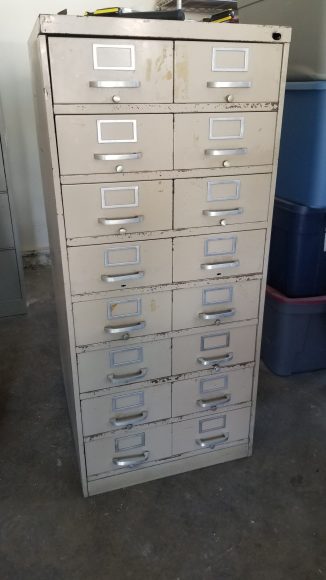
So today I took the plunge and picked up a Singer Business Furniture 20 gauge steel industrial index card filing cabinet. It’s the sort of thing that Niklas Luhmann or Roland Barthes may have only dreamt of.
One of the double drawers pulled out.
The monster has 8 sliding platform chassis with 16 removable file drawers. I’ve done a little bit of clean up on it, but it has been well loved over time. Much like my prior furniture refurbishment projects, I expect I’ll bead blast off the original finish and rust and re-enamel it. I’m debating colors or potentially going brushed steel with heavy clear coat, though that’s a lot of work for the size and configuration. I’m initially thinking perhaps gunmetal grey with metallic blue flecked paint to match my desk, or perhaps a fun orange highlight color on the drawer fronts?
Specifications
Singer Business Furniture, Corry Jamestown index card filing cabinet (114 OB)
8 slider chassis with 16 individually (and easily) removeable drawers
Exterior dimensions: 22 7/8″ wide x 52″ tall x 28 3/4″ deep
Interior drawer dimensions: 9 3/8″ wide x 4 3/4″ tall x 27 3/8″ deep (or 26 1/8″ deep with the card stops installed)
Original industrial beige color, chipped and scratched
20 gauge steel
I thought about weighing it, but the thing is just too big for any of the nearby scales I’ve got access to. It’s definitely a bear to move even by sliding and required a heavy dolly and at least two people to maneuver. Three or more would be required to pick it up physically. One drawback to the size and weight is that it isn’t easily portable if there were an emergency, but the construction is so solid that it should definitely survive the most dire earthquakes or possibly nuclear bomb blasts. I suspect it’ll be a bit before I have multiple drawers full, so I can always individually remove active drawers.
A quick calculation on the front of an index card—no more backs of envelopes for me!—indicates that packs of relatively standard Oxford index cards should put the capacity of this monster at 55,700 index cards (with the drawer stops in place).
Photos
It’s going to need some rehab work, but it’s quite magestic
Front view of the massive slip box
One of the double drawers pulled out.
View of one of the individual drawers from above
Almost all the drawers have their original index card rods
Some 4×6 index cards ready for action
One of the individual file drawers removed and sitting on its mate.
The original Singer sticker on the top inside drawer
Close up of the thumbscrew and notch on one of the index card file rods
Each index card file rod slots has a small “key” notch for securing it
Close up of the metal file card stop
A simple spring clip mechanism makes the card stops easy to move
It’s the small touches like the thumb indent on the card stop that really make the difference
An internal piece of the cabinet that wasn’t painted at the factory
Some of the trash that was cleaned out of the cabinet
Features
The drawers should be nice and roomy for the 4×6″ index cards I’ve been using, but can also accommodate collections of smaller 3×5″ cards I’ve got.
While the drawers come with index card rods to hold the cards physically in their files, I suspect I won’t be using them. They seem to be of a design that would require custom cards for utilizing this feature anyway. I do quite like the rod design as the thumbscrews on the outside have small nubs on them with a key-like cut out on the drawer front with a compression washer. One then inserts the rod, fits it into the moveable card stop, and pushes it into the keyhole. A quarter or half turn of the rod and thumbscrew locks the rod into the cabinet.
The index card file stops are easily removable and have a simple springloaded clamp mechanism for moving them easily within the drawer.
While used, the entire thing is in generally excellent shape. Almost all the original hardware is still extant and the drawer mechanisms all slide smoothly, so those won’t require much, if any real work.
Because the filing cabinet is so massive and generally immovable, a fun and terrifically convenient feature is that each of the 16 file drawers are individually removable. This allows one to take a particular drawer or two to their desk and work on them before needing to return them to the cabinet when one is done. To make this drawer movement easier, in addition to the explicit handle on the front of each drawer, there’s an oval hole on the back of each drawer which functions as a handle on the other end. This is likely how I’ll use it, at least until I’ve refinished the cabinet and the drawers and move it into my office space permanently.
One of the individual file drawers removed and sitting on its mate.
Because the files are wide and long enough, I might also profitably use the file for holding 8 1/2 x 11″ material stacked up in piles if necessary.
Naming
Some have talked about naming their zettelkasten. I’ve been considering calling the whole cabinet “The Ark of Studies” (Arca studiorum) after Thomas Harrison’s invention in the 1640s as it also contains a nod to Hugh of St. Victor’s mnemonic work relating to Noah’s Ark. Perhaps I’ll hame it Stonehenge II, because I’ll rely on it as a “forgetting machine” and it’s almost as big and heavy as a bluestone from the Preseli Hills in Wales—especially if I paint it that color. Beyond this perhaps I might give each individual drawer a name. This leaves sixteen slots, so I’m thinking about naming them after famous figures in the history of note taking and related spaces of intellectual history.
Right now it’ll likely be a subset of Aristotle, Cicero, Quintilian, Seneca, Boethius, Thomas Aquinas, Desiderius Erasmus, Rodolphus Agricola, Philip Melancthon, Konrad Gessner, John Locke, Carl Linnaeus, Thomas Harrison, Vincentius Placcius, Gottfried Wilhelm Leibniz, Niklas Luhmann, Beatrice Webb, Marcel Mauss, Claude Lévi-Strauss, Mortimer J. Adler, Niklas Luhmann, Roland Barthes, Vladimir Nabokov, George Carlin (I’ve got to have a drawer dedicated to comedy right?), Twyla Tharp, and Eminem. Who else am I missing? Who should I consider?
Oddities
Being a piece of used office furniture, it naturally came with some surplus junk inside. Most of this was of the paperclip and rubber band nature with plenty of dust and lint. There were a full collection of drawer labels with someone’s handwritten numbers for the files the card index once contained. Unexpected finds included some screws, nuts and bolts, part of a hacksaw blade, a rotary saw blade, some drill bits, a socket wrench fitting, and—most puzzling—a live round of ammunition! Every zettelkasten should have one of these right?
The oddest thing I found hiding in my new slip box.
So go ahead and bite the bullet! Get your own cabinet, and start your analog zettelkasten today.
I wasn’t expecting it until next week or shortly thereafter, but just in time for the new academic year, Dan Allosso has finished a major rewrite on his and S.F. Allosso’s earlier edition of A Short Handbook for writing essays in the Humanities and Social Sciences. This expanded edition has several new chapters on note making (notice that this is dramatically different than note taking) using a zettelkasten-based (or card index or fichier boîte if you prefer) approach similar to that practiced by Beatrice Webb, Marcel Mauss, Claude Lévi-Strauss, Roland Barthes, Hans Blumenberg, Mortimer J. Adler, and Walter Benjamin among many others.
The focus of the book is on note making for actively producing tangible outputs (essays, papers, theses, monographs, books, etc.), something on which a few recent texts in a the related productivity space haven’t delivered. While ostensibly focused on the humanities and social sciences in terms of examples, the methods broadly apply to all fields. In fact, some of the methods draw historically on some of the practices fruitfully used by Bacon, Newton, Leibnitz, Linnaeus, and many others in the sciences since.
This isn’t your father’s note making system…†
While many students (especially undergraduates and graduate students) may eschew this sort of handbook as something they think they “already know”, I can assure you that they do not and will benefit from the advice contained therein, particularly the first half. I’ve often heartily recommended Sönke Ahrens’ book How to Take Smart Notes: One Simple Technique to Boost Writing, Learning and Thinking to many in the past, but I think Allosso’s version, while similar in many respects, is clearer, shorter, and likely more easily realized by new practitioners.
There’s more detail in Dr. Allosso’s announcement video:
For those in the educational spaces, Dr. Allosso has given the book a Creative Commons license (CC BY-NC-SA 4.0), so that people can use it as an Open Educational Resource (OER) in their classes and work.
For teachers who are using social annotation with tools like Hypothes.is in their classrooms, Allosso’s book is an excellent resource for what students can actively do with all those annotations once they’ve made them. (Here’s a link to my annotated copy of a recent working draft if you care to “play along”.)
† Unless of course your father happens to be Salvatore Allosso, but even then…
I’ve noticed that u/khimtan has a more visual stye of note taking with respect to their cards, but is anyone else doing this sort of visualization-based type of note taking in the vein of sketchnotes or r/sketchnoting? I’ve read books by Mike Rohde and Emily Mills and tinkered around in the space, but haven’t actively added it to my practice tacitly. For those who do, do you have any suggestions/tips? I suspect that even simple drollery-esque images on cards would help with the memory/recall aspects. This may go even further for those with more visual-based modes of thinking and memory.
The interesting piece is that if many are doing this in public, then folks can reply to others’ notes and even cross-link their public notes. (They’ve got the ability to have public and private notes, as well as groups for collaboration, which are functionalities most ZK don’t have as well.)
I was reminded of this potential off-label use case when someone replied to an older note with a quote/comment and it nudged me to add a note to link the two together. Who’s up for a public, social zettelkasten practice?
I know some have mentioned Hypothes.is as an annotation tool for their note taking before. There are a few who use it as an online platform for notes and then they leverage the platform’s API or feeds to export their data to their tool of choice. (I’ve used Hypothes.idian for Obsidian to do just this.)
Perhaps too much of the resurgence of the zettelkasten idea and the online space about it is focused on what a zettelkasten is or how it should be done. After this, descriptions of the process of collecting material for one’s zettelkasten is followed by using it to generate new ideas and thought, though this last part is relatively sparce in comparison. Very little of the discussion or examples I’ve seen in online fora, social media, websites, and the blogosphere is focused on actively using them for creating actual long form output.
As Luhmann’s (all-too-frequently used) example is so powerful, I think it would be massively helpful if users had stronger examples of what these explicit creation workflows looked like, particularly at the longer end of creation of chapters or even book length spaces. Are there any detailed posts, videos, other media about how one approached this problem? What worked well? What didn’t? What would you do differently next time? Have you done this multiple times and now settled into something you feel is most efficient? Is your process manual/digital? What tools helped along the way for laying out and doing the actual stitching together and editing? Would you use them again or try something else? Have you experimented with different methods or practices?
Here, I’m looking for direct and actual experience; I’m explicitly not looking for “this is how I would do it” responses.
Because it’s much easier and far more successful for humans to imitate the practice of others than to innovate it for themselves, I’m ultimately looking not for outlines of what people recommend, but public examples of the practices in progress. Who can show their actual “receipts” and in a reasonably linear and practical way for others to follow? We suffer from a lack of these practices being visible online as most aren’t. Further even the digital ones aren’t public, or if they are, they aren’t well known.
As an example of the broader problem, I’ve yet to see a week go by that someone doesn’t read Ahrens’ generally excellent book, but in posting online they still seem lost in attempting to put the lowest level ideas into active practice.
Personally, I use Hypothes.is as a digital tool for the majority of my note taking. One could follow my feed and see it in real time if they choose. There are benefits for this public practice and I’m aware that many people follow this feed of notes out of curiosity. I’ve even gotten emails from folks indicating that they’ve learned some interesting things for use in their own practices. Sadly, the follow up of revision, cross linking, active indexing, and subsequent growth isn’t public (yet), though the platform I’m using is open to active public conversation and commentary, which is a useful side benefit. I have seen a few other public examples of others’ practices, some in video form, though this can be dull as the time and effort is work and doesn’t make for powerful entertainment because it isn’t. Still these public examples can be far more powerful than some of the explanations I’ve seen, especially for beginners who don’t comprehend the long term benefits (surprise, serendipity, insight, emergent creativity) and who generally focus on the minutiae for lack of direct experience.
On the creation portion, I’m currently experimenting with carrying out the original instructions of Konrad Gessner, an early zettelmacher, as laid out in his book Pandectarum sive Partitionum Universalium. (1548. Zurich: Christoph Froschauer) and hope to report back shortly about the experience.
Call for explicit examples
So where are the examples? Show us your receipts. Who’s doing this in public that people can follow? Who can be imitated until people have the experience(s) to do this more easily on their own? Let’s collect some of the best (or at least extant) examples for sharing with others.
Once we’ve got some concrete examples then we can study them and iterate on them.
Too many people seem intent on potentially wasting their time by innovating on a practice they haven’t even tried because someone in the productivity space (who usually hasn’t tried it either) wrote a page long post saying it would be a good idea. I know we can do far better.
Matt Ridley indicates in The Rational Optimist that markets for goods and services “work so well that it is hard to design them so they fail to deliver efficiency and innovation” while assets markets are nearly doomed to failure and require close and careful regulation.
If we view the social media landscape from this perspective, an IndieWeb world in which people are purchasing services like the ability to move their domain name and URL permalinks from one web host to another; easy import/export of their data; and CMS (content management system) services/platforms/functionalities, represents the successful market mode for our personal data and online identities. Here competition for these sorts of services will not only improve the landscape, but generally increased competition will tend to drive the costs to consumers down. The internet landscape is developed and sophisticated enough and broadly based on shared standards that this mode of service market should easily be able to not only thrive, but innovate.
At the other end of the spectrum, if our data are viewed as assets in an asset market between Facebook, Instagram, Twitter, LinkedIn, et al., it is easy to see that the market has already failed so miserably that one cannot even easily move ones’ assets from one silo to another or really protect them in any meaningful way. Social media services don’t compete to export or import data because the goal is to trap you and your data and attention there, otherwise they lose. The market corporate social media is really operating in is one for eyeballs and attention to sell advertising, so one will notice a very health, thriving, and innovating market for advertisers. Social media users will easily notice that there is absolutely no regulation in the service portion of the space at all. This only allows the system to continue failing to provide improved or even innovative service to people on their “service”. The only real competition in the corporate silo social media space is for eyeballs and participation because the people and their attention are the real product.
As a result, new players whose goal is to improve the health of the social media space, like the recent entrant Cohost, are far better off creating a standards based service that allows users to register their own domain names and provide a content management service that has easy import and export of their data. This will play into the services market mode which improves outcomes for people. Aligning in any other competition mode that silos off these functions will force them into competition with the existing corporate social services and we already know where those roads lead.
Those looking for ethical and healthy models of this sort of social media service might look at Manton Reece‘s Micro.blog platform which provides a wide variety of these sorts of data services including data export and taking your domain name with you. If you’re unhappy with his service, then it’s relatively easy to export your data and move it to another host using WordPress or some other CMS. On the flip side, if you’re unhappy with your host and CMS, then it’s also easy to move over to Micro.blog and continue along just as you had before. Best of all, Micro.blog is offering lots of the newest and most innovative web standards including webmention notifications which enable website-to-website conversations, micropub, and even portions of microsub not to mention some great customer service.
I like to analogize the internet and social media to competition in the telecom/cellular phone space In America, you have a phone number (domain name) and can then have your choice of service provider (hosting), and a choice of telephone (CMS) for interacting with the network. Somehow instead of adopting a social media common carrier model, we have trapped ourselves inside of a model that doesn’t provide the users any sort of real service or options. It’s easy to imagine what it would be like to need your own AT&T account to talk to family on AT&T and a separate T-Mobile account to talk to your friends on T-Mobile because that’s exactly what you’re doing with social media despite the fact that you’re all still using the same internet. Part of the draw was that services like Facebook appeared to be “free”. It’s only years later that we’re seeing the all too real costs emerge.
This sort of competition and service provision also goes down to subsidiary layers of the ecosystem. New service providers don’t necessarily need to take the soup to nuts approach that Micro.Blog does. Take for example the idea of writing interface and text editing. There are (paid) services like iA Writer, Ulysses, and Typora which people use to compose their writing. Many people use these specifically for writing blog posts. Companies can charge for these products because of their beauty, simplicity, and excellent user interfaces. Some of them either already do or ostensibly could support the micropub and IndieAuth web standards which allow their users the ability to log into their websites and directly post their saved content from these editors directly to their website. Sure there are also a dozen or so other free micropub clients that also allow this, but why not have and allow competition for beauty and ease of use? Let’s say you like WordPress enough, but aren’t a fan of the Gutenberg editor. Should you need to change to Drupal or some unfamiliar static site generator to exchange a better composing experience for a dramatically different and unfamiliar back end experience? No, you could simply change your editor client and continue on without missing a beat. Of course the opposite also applies—WordPress could split out Gutenberg as a standalone (possibly paid) micropub client and users could then easily use it to post to Drupal, Micro.blog, or other CMSs that support the micropub spec, and many already do.
Social media should be a service to and for people all the way down to its core. The more companies there are that provide these sorts of services means more competition which will also tend to lure people away from silos where they’re trapped for lack of options. Further, if your friends are on services that interoperate and can cross communicate with standards like Webmention from site to site, you no longer need to be on Facebook because “that’s where your friends and family all are.” The more competition there is for cleaner, nicer user interfaces and simple solutions, the less lock in effects will be felt from existing and predatory social services.
I have no doubt that we can all get to a healthier place online, but it’s going to take companies and startups like Cohost to make better choices in how they frame their business models. Co-ops and non-profits can help here too. I can easily see a co-op adding webmention to their Mastodon site to allow users to see and moderate their own interactions instead of forcing local or global timelines on their constituencies. Perhaps Garon didn’t think Webmention was a fit for Mastodon, but this doesn’t mean that others couldn’t support it. I personally think that Darius Kazemi‘s Hometown fork of Mastodon which allows “local only” posting a fabulous little innovation while still allowing interaction with a wider readership, including me who reads his content from there in a microsub enabled social reader. Perhaps someone forks Mastodon to use as a social feed reader, but builds in micropub so that instead of posting the reply to a Mastodon account, it’s posted to one’s IndieWeb capable website which sends a webmention notification to the original post? Opening up competition this way makes lots of new avenues for every day social tools. One might posit that it was this lack of diverse solutions and common standards in the early 2000s that allowed corporations like Facebook, Twitter, et al. to entirely consume the market and fragment our online identities this way.
Continuing the same old siloing of our data and online connections is not the way forward. We’ll see who stands by their ethics and morals by serving people’s interests and not the advertising industry.
I too almost immediately thought of Fraidyc.at and its nudge at shifting the importance of content based on time and recency. I’d love to have a social reader with additional affordances for both this time shifting and Ton’s idea of reading based on social distance.
I’m struck by the seemingly related idea of Peter Hagen’s LindyLearn platform and annotations which focuses on taking some of the longer term interesting ideas as the basis for browsing and chewing on. Though even here, one needs some of the odd, the cutting edge, and the avant garde in their balanced internet diet. Would Spring ’83 provide some of this?
I’m also struck by some similarities this has with the idea of Derek Siver’s /now page movement. I see some updating regularly while others have let it slip by the wayside. Still the “board” of users exists, though one must click through a sea of mostly smiling and welcoming faces to get to it the individual pieces of content. (The smiling faces are more inviting and personal than the cacophony of yelling and chaos I see in models for Spring ’83.) This reminds me of Stanley Meyers’ frequent assertion that he attempted to design a certain “sense of quiet” into the early television show Dragnet to balance the seeming loudness of the everyday as well as the noise of other contemporaneous television programming.
The form reminds me a bit of the signature pages of one’s high school year book. But here, instead of the goal being timeless scribbles, one has the opportunity to change the message over time. Does the potential commercialization of the form (you know it will happen in a VC world crazed with surveillance capitalism) follow the same trajectory of the old college paper facebook? Next up, Yearbook.com!
Beyond the thing as a standard, I wondered what the actual form of Spring ’83 adds to a broader conversation? What does it add to the diversity of voices that we don’t already see in other spaces. How might it be abused? Would people come back to it regularly? What might be its emergent properties? This last is hard to know without experimenting at larger scales.
It definitely seems quirky and fun in and old school web sort of way, but it also stresses me out looking at the zany busyness of some of the examples of magazine stands. The general form reminds me of the bargain bins at book stores which have the promise of finding valuable hidden gems and at an excellent price, but often the ideas and quality of what I find usually isn’t worth the discounted price and the return on investment is rarely worth the effort. How might this get beyond these forms?
It also brings up the idea of what other online forms we may have had with this same sort of raw experimentation? How might the internet have looked if there had been a bigger rise of the wiki before that of the blog? What would the world be like if Webmention had existed before social media rose to prominence? Did we somehow miss some interesting digital animals because the web rose so quickly to prominence without more early experimentation before its “Cambrian explosion”?
I’ve been thinking about distilled note taking forms recently and what a network of atomic ideas on index cards look like and what emerges from them. What if the standard were digital index cards that linked and cross linked to each other, particularly in a world without adherence to time based orders and streams? What does a new story look like if I can pull out a card either at random or based on a single topic and only see it or perhaps some short linked chain of ideas (mine or others) which come along with it? Does the choice of a random “Markov monkey” change my thinking or perspective? What comes out of this jar of Pandora? Is it just a new form of cadavre exquis?
This standard has been out for a bit and presumably folks are experimenting with it. What do the early results look like? How are they using it? Do they like it? Does it need more scale? What do small changes make to the overall form?
For more on these related ideas and the experiment, see some of these threads of conversation I’m aware of: