Tag: Zettelkasten
Details:
cc: Ian O’Byrne, Remi Kalir
The tattoos on Leonard Shelby’s body in the film Memento act as a physical zettelkasten of information stored on skin rather than index cards. He uses his permanent notes to supplement his fleeting memory to solve a murder.

The real question is what additional value and affordances does this pattern allow? Some of the value is in emptying your head (forgetting) as seen in productivity systems like 43 folders or doing Morning Pages. I suspect that rarely are people revising these tidbits at later times to get additional value from them.
Outside of this, systems like Roam Research may make it easier to create a diary like this with the day’s work, but the real value there is not the date/timeline created, but the way that the system treats each block like its own unit of knowledge and allows cross linking them. In this case, the real precursor goes back at least as far as Konrad Gessner’s Pandectarum sive Partitionum Universalium (1548), which provides a classic definition of the zettelkasten format, though this obviously is heavily informed by the earlier traditions of excerpting and annotating found in commonplace books, florilegia, etc. stemming from the ideas of rhetoric from the Greeks and Romans.
In oral cultures, precursors of this sort of time ordering can be seen with respect to the ideas of ancestral time, genealogy, and techniques like the songline in Australia, but the implementations will vary and it’s unlikely that one might find a complete one-to-one mapping of these ideas into Western cultures.
I've been meaning to do some kind of index card style template for the site for ages and never got round to it. Now I have. I’m quite pleased with it. CSS repeating gradient lines and all that. ❧
ᔥ in // pimoore.ca ()
Handwriting my Website with a Digital Amanuensis
A Capital User Interface Idea
A few weeks ago I saw Ben Stokes’ post about PaperWebsite.com and my immediate reaction was, “I have to be able to do that!” I’ve long enjoyed writing by hand over typing as the tactile feel of of pen or pencil and paper is such an enjoyable one. I particularly enjoy using a nice fountain pen on high quality paper.
Obviously there was a route to doing a workflow like this as Ben had shown. I just needed to figure out a method with a low enough barrier that I could personally implement for doing this with my own WordPress website.
A Quick Solution
Not being a serious coder, I immediately began looking for ways I could leverage some of the IndieWeb building blocks my site supports. Micropub seemed like a no-brainer for the posting portion since I’ve got an endpoint using the Micropub WordPress plugin. Certainly not wanting to manually re-type everything once I was finished writing, I needed a way of converting my handwriting to text and then automating a way to plug that into my micropub client.
A short burst of searching revealed that Google Docs could do Optical Character Recognition (OCR) on photos. I pulled out my IFTTT app and found a recipe for taking a photo and saving it to Google Drive. Then I set up another recipe to watch a particular folder in Google Drive and take whatever text appears in new documents and send it to my website using a webhook that uses my Micropub endpoint. The whole thing only took a half hour from idea to a working prototype. In the end it took a tap to open IFTTT on my phone and another tap to take the photo. Then I had to manually open the document to trigger the OCR. Finally, I had to manually open and edit the post before posting.
I had set the micropub client to post as a draft as a default just in case the OCR wasn’t perfect. This was fortunate as the Google photo OCR was so solid that the letters “Dia” of the microscopic text from the word “Diamond” partially visible on my pen cap that was in the photo got pulled into the post.
In the few times I’ve used this workflow so far, I’ve mostly done straight text and syndicated posts to Twitter, Mastodon, and Micro.blog. Perhaps in the future I might set things up to add HTML links, but they’re fairly easy to add at the editing stage.
Since I started my experimentation, a few others in the IndieWeb community have noticed the paperwebsite.com site. Greg McVerry popped up and linked to it as well. He mentioned that he had a digital notebook with OCR capability. This reminded me that I’ve got both a Livescribe Echo pen and a Rocketbook notebook with a Pilot Frixion pen that has an app for uploading digitized images of notebook pages. I hadn’t done OER with Livescribe in ages, so I pulled out the Rocketbook, which is cleverly erasable and thus reusable not to mention being fairly inexpensive. A bit of quick set up allowed me to take a photo of a page which automatically uploads to Google Drive and does its own OCR process. This already dovetails with my prior process, so the whole thing is much smoother. As a result, I’m composing this post in my Rocketbook notebook and will automatically upload and post it to my site as a draft. I’ll probably add some links, a photo or two, and then publish it in a bit.
Rocketbook Interface
The Rocketbook notebook has some solid pages with an odd shiny texture and feel, presumably part of the technology that makes it easy to wipe them clean for reuse. The bottom of each page has seven different faint icon images which are meant to allow the app to determine where to send the digital copy of the notes. One can send them via email or to a variety of storage or sharing services. I could imagine having different recipes set up to allow one to publish their notes to different websites based on the icon X-ed out. Given the micropub possibilities, one could also use the icons as a means of differentiating post kinds (for example, indicating that a particular post is a note, an article, or a bookmark). Another alternate idea would be to use the icons as a means of selecting which services to syndicate your content to (for example, the diamond could mean syndicate this post to Micro.blog, the bell could mean Mastodon, and the clover syndicates the post to Twitter).

The overall process is quite elegant and pleasant. The OCR for Rocketbook is reasonably good aside from a few spelling errors which are easy enough to click and fix. I’ll admit that I far prefer using a fountain pen on some Tomoe River paper to using the Rocketbook paper and the Frixion pen, but really, who wouldn’t?
Handwritten notes for your digital zettelkasten or personal wiki
Since I’ve already got most of the infrastructure, I’ve gone the extra mile and set things up so that I can take notes on index cards zettelkasten-style and use a similar set up to post them to my Obsidian vault using similar IFTTT recipes.
Try it yourself
For those who want to set this up themselves, I’ve documented the IFTTT/micropub portion before. I’ll post the specific code I’m using below for these who may want it. The nice part is that as long as you have a micropub server for your website platform (there are many CMSs that have native or plugin support) the WordPress portion isn’t a deal breaker for others.
I’m sure, now that there are multiple proofs of concept, some enterprising developer will build a custom micropub client to do all of this work automatically or with a few options built into a clever interface.
I could see pen and paper manufacturers (Moleskin, Leuchtturm, Rocketbook, etc.) creating apps for doing this too. I’d love to see and hear about others trying this out for themselves. Hopefully it can be done with almost no code or some easy cut and paste from my example. Ask if you need help, and I’ll see what I can do to help.
IFTTT Webhook settings
This following will be roughly standard for WordPress endpoints using the plugin, but they can obviously be modified for your platform of choice.
- URL:
https://example.com/wp-json/micropub/1.0/endpoint - Method:
POST - Content type:
application/x-www-form-urlencoded - Body:
access_token=PasswordHere&content=<<<{{Body}}>>>&h=entry&category[]=Social%20Stream&post-status=published&visibility=private
Historical examples
While doing some of this I did come across some older examples of handwriting to websites. Aside from handwriting typography which I think is usually ugly, I saw some interesting examples from Jeff Bridges[1] [2], gRegor Morrill, and scrolled through some great examples of handwritten and typed Tweets by Alton Brown. In his case, he was simply taking photos of his writing, but it worked! I’ll admit he had some fun and was definitely creative about it. Hopefully Twitter always exists to save the copies for him.
— Alton Brown (@altonbrown) November 20, 2012
— Alton Brown (@altonbrown) December 22, 2012
— Alton Brown (@altonbrown) December 10, 2012
— Alton Brown (@altonbrown) October 10, 2012
Conclusion
In short, I’ve now got another great way to post to my website. I love the great old school tactile user interface of pen and paper. Now I’m glad to have a reason to be able to do more of it in an ever-digitized culture.
Until I start working on cuneiform solutions…
Write On! 🖋
Editor’s note: This post was originally handwritten on Dec 16, 2021 at 20:15.
Does Spirit hide in the filing cabinet?
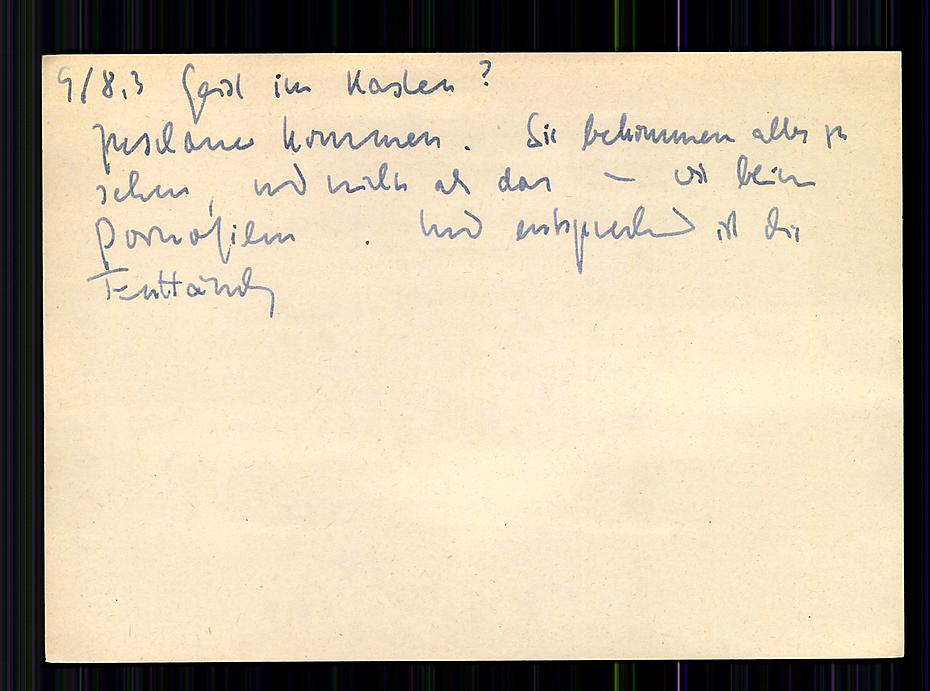
“People come, they see everything and nothing more than that, just like in porn movies; consequently, they leave disappointed.”
This is a telling story about people’s perception of the simplicity of the idea of a slip box (zettelkasten, card catalog, commonplace book or whatever you want to call your note taking system).
Niklas Luhmann, Zettelkasten II, index card no. 9/8,3
It’s also a testament to the fact that the value of a zettelkasten is in the upfront work that is required in making valuable notes and linking them. Many people end up trying out the simple looking system and then wonder why it isn’t working for them. The answer is that they’re not working for it.
Just as sex can be fun, working with a system of notes can be fun. (“Just” can be a problematic word, n’cest pas?) In either framing, both partners need to do some work—neither necessarily the same work. The end result can be magic.
As Potter Stewart might have said, “I may not be able to define proper note taking, but I know it when I see it.”
Some notes about the semantic change of “interlink” and “backlink”
doubleloop[m] APP 12:30 PM
I have some notes I’ve taken on interlinking wikis here – https://commonplace.doubleloop.net/interlinking-wikis
tantek 12:39 PM
doubleloop[m], what’s the difference between “just” a link and an “interlink” from a user perspective?
genuine question (feel free to also answer if you have an idea @chrisaldrich) because Wikipedia seems to consider “interlink” as a common noun to be a synonym for “hyperlink” https://en.wikipedia.org/wiki/Interlink
Chris Aldrich 20:45 PM
I think that the definition for interlinking is expanding based on actual use cases. Historically Tim Berners Lee tried to create hyperlinks as bi-directional and then scrapped the idea as not easily implementable. As a result we’ve all come to expect that links are uni-directional.
In the digital gardens, wiki spaces and now, even with Webmention, there’s an expectation (I would suggest) by a growing number of people that some links in practice will be bi-directional.
If Neil puts a link to something within his own wiki/digital garden, he’s expecting that to be picked up in a space like the Agora and it will interlink his content with that of others.
Many who are practicing POSSE/PESOS are programatically (or manually) placing backlinks between their content and the copies that live on silos creating a round trip set of links that typically hasn’t been seen on the web historically.
Because we’ve mostly grown up with a grammar of single directional links and no expectation of visible reverse links (except perhaps in the spammy framing of SEO linkfarms), the word “interlink” has taken on the connotation seen in Wikipedia. I think that definition is starting to change.
Among a class of users in the note taking/personal knowledge management space (Roam Research, Obsidian, Logseq, TiddlyWiki, et al) most users are expecting tools to automatically interlink (in my definition with the sense of an expected bi-directional link) pages. Further, they’re expecting that if you change the word(s) that appear within a [[wikilink]] that it will globally change all instances of that word/phrase that are so linked within one’s system.
In many of those systems you can also do a manual /redirect the way we do on the IndieWeb wiki, but they expect the system to actively rename their bi-directional links without any additional manual work.
tantek 1:08 PM
ok, the bidirectionality as expectation is interesting
Chris Aldrich 1:08 PM
By analogy, many in the general public have a general sense of what /syndication is within social media, but you (Tantek) and others in the IndieWeb space have created words/phrases/acronyms that specify a “target” and “source” to indicate in which direction the syndication is being done and between sites of differing ownership (POSSE, PESOS, PASTA, PESETAS, POOSNOW,… not to mention a linear philosophical value proposition of which are more valuable to the end user). There is a group of people who are re-claiming a definition of the words “interlink” and perhaps “backlink” to a more logical position based on new capabilities in technology. Perhaps it may be better if they created neologisms for these, but linguistically that isn’t the path being taken as there are words that would seem to have an expandable meaning for what they want. I’d classify it as a semantic change/shift/drift in the words meanings: https://en.wikipedia.org/wiki/Semantic_change
I suspect that if Roam Research, or any of the other apps that have this bi-directionality built in, were to remove it as a feature, they’d loose all of their userbase.
tantek 1:11 PM
yes, such a semantic shift in the meaning of “interlink” seems reasonable, and a useful distinction from the now ubiquitously expected unidirectionality of “hyperlink”
Chris Aldrich 1:12 PM
I’m expecting that sometime within the next year or so that major corporate apps like Evernote and OneNote will make this bi-directional linking a default as well.
tantek 1:12 PM
in sci-fi metaphor terms, one-way vs two-way wormholes (per other uses of “hyper”)
Chris Aldrich 1:14 PM
I can only imagine what a dramatically different version of the web we’d be living in if the idea of Webmention had existed in the early 90s. Particularly as there’s the ability to notify the other end in changes/updates/deletions of a page. Would the word “linkrot” exist in that world?
Joe Crawford 1:22 PM
Or in a world with Xanaduian transclusions, for that matter.
Alas
Chris Aldrich 1:25 PM
Related to this and going into the world of the history of information is the suggestion by Markus Krajewski in “Paper Machines: About Cards & Catalogs, 1548-1929” that early card catalog and index card systems are really an early paper/manual form of a Turing Machine: https://mitpress.mit.edu/books/paper-machines.
One might imagine the extended analogy libraries:books:index cards :: Internet:websites:links with different modes and speeds of transmission.
Visualization of Luhmann's Zettelkasten, using the thought Condensr think tool.
For transcript and links see https://x28newblog.wordpress.com/2019/06/21/zettelkasten-visualized/

More details to come on this fun bit of history soon.
[[2021-11-23]] 7:30 PM
Field Notes: Reporter's Notebook from Coudal Partners on Vimeo.
John Dickerson of “Face the Nation” talks about how he uses a Reporter’s Notebook and how he helped Field Notes make one. ❧
While he doesn’t mention it, he’s capturing the spirit of the commonplace book and the zettelkasten.
[…] I see my job as basically helping people see and to grab ahold of what’s going on.
You can decide to do that the minute you sit down to start writing or you can just do it all the time. And by the time you get to writing you have a notebook full of stuff that can be used.
And it’s not just about the thing you’re writing about at that moment or the question you’re going to ask that has to do with that week’s event on Face the Nation on Sunday.
If you’ve been collecting all week long and wondering why a thing happens or making an observation about something and using that as a piece of color to explain the political process to somebody, then you’ve been doing your work before you ever sat down to do your work.
I’d love to interview him about his process as well as keeping track of his notes after-the-fact. Does he index them? Collate them? How does he archive them? What role do they play in his book writing processes? Is his system something that he was taught, something which he created and refined over time, or a little bit of both?
Zettelkasten History Prior to Niklas Luhmann: Antonin Sertillanges
The book was published in French, Italian, and English in more than 50 editions over the span of 40 years. In it, Sertillanges recommends taking notes on slips of “strong paper of a uniform size” either self made with a paper cutter or by “special firms that will spare you the trouble, providing slips of every size and color as well as the necessary boxes and accessories.” He also recommends a “certain number of tagged slips, guide-cards, so as to number each category visibly after having numbered each slip, in the corner or in the middle.” He goes on to suggest creating a catalog or index of subjects with division and subdivisions and recommends the “very ingenious system”, the decimal system, for organizing one’s research. For the details of this refers the reader to Organization of intellectual work: practical recipes for use by students of all faculties and workers by Paul Chavigny.[2]
Sertillanges recommends against the previous patterns seen with commonplace books where one does note taking in books or on slips of paper which might be pasted into books as they don’t “easily allow classification” or “readily lend themselves to use at the moment of writing.”
[1] Antonin, Sertillanges (1960). The Intellectual Life: Its Sprit, Conditions, Methods. Translated by Ryan, Mary (fifth printing ed.). Westminster, Maryland: The Newman Press. pp. 186–198.
[2] Chavigny, Paul (1918). Organisation du travail intellectuel: recettes pratiques à l’usage des étudiants de toutes les facultés et de tous les travailleurs (in French). Delagrave.
Featured Image: zettelkasten flickr photo by x28x28de shared under a Creative Commons (BY-SA) license
Gardens and Streams II: An IndieWebCamp Pop-up Session on Wikis, Digital Gardens, Online Commonplace Books, Zettelkasten and Note Taking
Event Details
Date: Saturday, September 25, 2021
Time: 9:00 AM – 1:00 PM Pacific
Event page: https://events.indieweb.org/2021/09/gardens-and-streams-ii-pPUbyYME33V4
We’ll discuss and brainstorm ideas related to wikis, commonplace books, digital gardens, zettelkasten, and note taking on personal websites and how they might interoperate or communicate with each other. This can include IndieWeb building blocks, user interfaces, functionalities, and everyones’ ideas surrounding these. Bring your thoughts, ideas, and let’s discuss (and build).
This will be a continuation of the ideas from the Garden and Stream pop up session in 2020. Everyone is welcome and need not have attended prior sessions.
Format
We’ll try to do something between a traditional all day IndieWebCamp and a single session pop-up over the span of several hours so that we can accommodate a brief introduction and three BarCamp topic related sessions. Feel free to brainstorm session ideas in advance of the mini-camp, but we’ll choose session topics the morning of the event.
Tentative Schedule
All times Pacific.
- 9:00 AM 30 minute introduction & IndieWeb building blocks
- 9:30 AM 20 minute session pitches and scheduling
- 9:50 AM 10 minute break
- 10:00 AM 60 minute Session 1 (including 10 minute break)
- 11:00 AM 60 minute Session 2 (including 10 minute break)
- 12:00 PM 50 minute Session 3
- 12:50 PM 10 minute closing remarks
- 1:00 PM pop up finished
Hack day? Yes, we’ll all gather the following day for 3 hours at roughly the same time with a short demo session to follow for folks to show off what they’ve been working on. Details for this will be forthcoming.
Everyone is welcome to attend.
Resources
- Technology for attending
- IndieWeb Chat Room
- Etherpad: https://etherpad.indieweb.org/GardensAndStreams (for real time session planning, chat, questions, and note taking during the session)
- hashtag: #GardensAndStreams
- Code of Conduct: This event is covered by the IndieWeb Code of Conduct. By participating, you’re acknowledging your acceptance of this code.
- Notes and archived video for this session, once finished, can be found at https://indieweb.org/2021/Pop-ups/Gardens_and_Streams_II
RSVP (optional)
- If your website supports it, post an indie RSVP as a reply to this post or to the event page.
- Or, log in to indieweb.org and on the event page click “I’m Going”.
- Or, RSVP your attendance to this syndicated Tweet
- Or, Add a comment below indicate that you’ll be attending.
And if none of the above methods means anything to you or you can’t log in to use them, don’t worry about it; just show up on the day!
Questions? Concerns? Volunteers?
Feel free to ask in the IndieWeb chat: https://chat.indieweb.org/indieweb/ or post a question below or on the call for volunteers post.