
Got some preliminary work done so that handwritten posts are posted by my new “app” Amanuensis using micropub. Soon I hope to be able to visually credit the app on my posts’ metadata.
Month: December 2021
I finished up the last of the September apples tonight. 🍏
Annotation Colors Using Hypothes.is: Problems and Solutions
I frequently see the feature request from Hypothes.is users to have the tool add the ability to choose different colors for highlights.
The first occurrence of the issue is probably documented here: https://github.com/hypothesis/vision/issues/123, by the head of the company.
I suspect it may take a while before such a color feature might be built in, if ever. (Here I’ll note that I don’t work for or speak for the company or any of the other open source developers on the project, but I am one what one would consider a “heavy user”.) If they have the time (I know they’re very busy), perhaps they may chime in with a potential roadmap or other ideas.
Color highlights are a difficult user interface problem
While I’m thinking about it, in an academic context for students, colors may be slightly better indicators of different users’ annotations of a particular text as a means of differentiating one annotator from another more subtly, particularly on texts that are extensively marked up.
Just this difference points out what a mixed bag of functionality colored highlights brings from a usability, design, and user interface perspective. While colored highlights is a seemingly “simple” sounding feature in the analog world where a single document is only annotated by one user, mapping it into a digital shared context is a difficult engineering problem to navigate and solve for. What if your color meanings aren’t the same as those of another?, for example.
While colors can be useful for individuals, do they have the same place in a social annotation product?
I already find it difficult to annotate heavily annotated pages that all use the same color, much less a rainbow of others’ colors. (If this is also you, I’ll note that there’s a handy “eye” icon in the annotation drawer that will allow you to turn them on/off.)
Potential Color Highlight Hacks
While the value of colors may be useful in some contexts, you could potentially use a few other features, functionality, and methods to creatively achieve a similar feature in Hypothes.is for yourself today. Below are a few potential creative “hacks” that some might try.
Use the tagging functionality
You could use the tagging system to create specific tags to stand in for your desired colors: As an example, in some systems I might use the following color designators:
- Yellow—general highlights and highlights which don’t fit under another category below
- Orange—Vocabulary word; interesting and/or rare word
- Green—Reference to read
- Blue—Interesting Quote
- Gray—Typography Problem
- Red—Example to work through
Instead of colors in Hypothesis, for example, one could use the tags “words” or “vocabulary”, “reference” or “citation“, “typo“, “quotes“, or “examples” to stand in for these particular “colors” respectively. I sometimes practice some of these which you can find by clicking on the links, though you may note that in practice I use other tags for them.
In some sense, this is what the software would be doing, particularly with regard to search for these after-the-fact. If you wanted a list of all your “citations” for example, you’d have to search for the color for that and be able to find them all, presuming this search functionality existed with such a color feature. This isn’t really much different than simply tagging all those particular highlights with words like “citation” or “reference” in the first place.
Use the Group Functionality
You could created different “groups” (private or public) to stand in for the colors you wish you had, thus a “yellow group” could be used for one “color” of highlight and a “green group” for another. ( See Annotating with Groups for more details.)
Switching between groups for annotating isn’t going to be drastically different than a user interface for switching colors of highlighter. The one drawback (or perhaps it’s a feature?) here is that you will only be able to see one “color” at a time.
Roll your own solution with open source
As ever, with some work, you could self-host the open source software and modify your copy to add this functionality in for yourself.
Some clever hacks in your browser with CSS might also give you your preferred output. I know some users have done custom work to the Hypothes.is UI in the past: eg. https://tomcritchlow.com/2019/02/12/annotations/, see his gist at the bottom of the post.
Another custom solution which may give you ideas can also be found at https://web.hypothes.is/blog/do-it-yourself-anchoring-and-the-evolution-of-the-hypothesis-toolkit/.
Perhaps adding custom classes on the tags or usernames might allow people the ability to target highlights on a page so that one could define custom CSS rules for each highlight using either usernames of tags as well? Of course, just like the “eye icon” described above, I’m sure there are times that people will appreciate the ability to turn these colors on and off. I personally don’t want the clean interface dressed up in Josephs Amazing Technicolor Annotation Dreamcoat.
Other solutions and problems?
Are there ideas or potential solutions for color highlights I’ve missed? How about design problems that might be encountered in implementing color-coded highlights in the older single document/single user model being transferred to a multi-user space with infinite scale? Is color the best and most accessible solution? Are there better things that could be done with color in the product?
Feel free to comment below with your ideas or links to examples.
Interested in other Hypothes.is hacks, tips, and ideas? Try browsing my Hypothes.is archive.

Presumably for Alverno, but Aldrich works well too!
Have a pleasant weekend. https://t.co/JVcFKDMHJJ
— Anthony Michael Kreis (@AnthonyMKreis) Dec 10, 2021
I’d probably have done it digitally with @Hypothes_is to share with others, but kudos to those who can still fathom the analog.
https://via.hypothes.is/https://www.gutenberg.org/files/145/145-h/145-h.htm
https://via.hypothes.is/https://www.gutenberg.org/files/145/145-h/145-h.htm
@AmberRegis The student who gave up flagging the text halfway through speaks for us all.
— And Sometimes Y (@MagicProf) Dec 10, 2021
So enforcing vaccine mandates is a violation of bodily freedom, but forcing pregnant people to carry to term isn’t?
— Robert Reich (@RBReich) Dec 10, 2021
Students Don't Read Syllabi, Exhibit 58623 https://t.co/uSuc8AisnD
— Connor Ewing (@ConnorMEwing) Dec 10, 2021
The Folkton Drums. Three cylinders carved from chalk about 5,000 years ago, during the Neolithic period. Decorated with geometric designs and stylised faces. Discovered, along with a bone pin, in a child’s round barrow (burial) in Yorkshire in 1889. #FindsFriday #Archaeology https://t.co/6IyUTN9bCt
— Alison Fisk (@AlisonFisk) Dec 10, 2021
Number of soccer fields per capita in European countries. There are more fields in Germany than anywhere else, but per capita, Liechtenstein wins. #dataviz https://t.co/YZ3vPUnuF8
— Anders Sundell (@sundellviz) Dec 10, 2021
Birth and Death La Vierge au Lys & Pieta - William-Adolphe Bouguereau (1889 - 1876) . https://t.co/Vv1o8oka9P
— Archaeology & Art (@archaeologyart) Dec 10, 2021
Does Spirit hide in the filing cabinet?
On a slip in his zettelkasten (a card catalog or filing cabinet of personal notes), entitled “Does Spirit hide in the filing cabinet?”, Niklas Luhmann wrote a note about people who came to see his system:
“People come, they see everything and nothing more than that, just like in porn movies; consequently, they leave disappointed.”
This is a telling story about people’s perception of the simplicity of the idea of a slip box (zettelkasten, card catalog, commonplace book or whatever you want to call your note taking system).
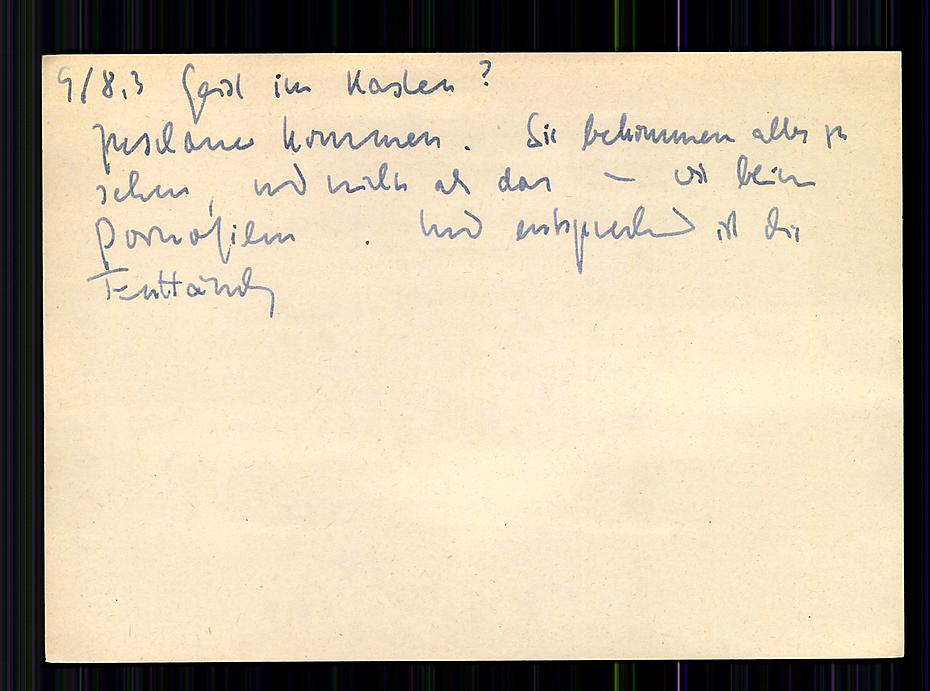
It’s also a testament to the fact that the value of a zettelkasten is in the upfront work that is required in making valuable notes and linking them. Many people end up trying out the simple looking system and then wonder why it isn’t working for them. The answer is that they’re not working for it.
Just as sex can be fun, working with a system of notes can be fun. (“Just” can be a problematic word, n’cest pas?) In either framing, both partners need to do some work—neither necessarily the same work. The end result can be magic.
As Potter Stewart might have said, “I may not be able to define proper note taking, but I know it when I see it.”
@wiobyrne, @AllossoDan has also been using it in his teaching. If you’re curious to see a use case applicable to the classroom, you might appreciate joining/watching an upcoming “book club” he’s doing w/ Obsidian over the holiday break: https://danallosso.substack.com/p/obsidian-book-club-the-dawn-of-everything.
