For online material, I use the Post Kinds Plugin which does a good job of adding h-cite and p-read-of (experimental) microformats classes to the data for the things I’ve read.
Because Post Kinds doesn’t (yet?) support percentage finished or number of pages read, I generally do read posts for books by hand as notes with the relevant data. So I decided to add some better mark up to my book-specific read posts and added microformats classes of h-cite, u-url, u-read-of, p-name, p-author, h-card and dt-published. I’m far from an expert on microformats, but hopefully the way I’m nesting them makes sense to parsers off in the future. (Suggestions for improvement are more than welcome.)
I like Gregor’s idea of p-read-status for things he’s posting and will have to see how I can pull that off for posts in the future (or suggest it as an addition to Post Kinds). Presently I’m just adding a want to read tag, but that could be improved to better match the functionality I appreciate in silos like Goodreads. I’ll also have to load up Gregor’s recent modifications to Quill and test them out on my site as well. I know David Shanske has expressed interest in better aligning Quill and micropub clients to post to WordPress with Post Kinds in mind.
Read pages 381-461 to finish reading <span class="h-cite"><cite><a class="u-url u-read-of p-name" href="http://amzn.to/2zXnQDC" target="_blank" rel="noopener">Origin: A Novel</a></cite> by <span class="p-author h-card"><a class="p-name u-url" href="http://danbrown.com/">Dan Brown</a></span><time class="dt-published" datetime="2017-10-103 00:00:00"></time></span>
It’s also made me begin to feel itchy about some of my past quote posts and potentially revisiting them to add the appropriate h-cite and related mark up to them as well. (Or at least fix it moving forward.)
Incidentally, my real camp project was some heavy editing work on “The Book.” More on that later…
I’ll note at the outset that there are larger, potentially more pressing problems relating to the current fires in Southern California, and I have every hope that they’re mitigated as quickly and smoothly as possible, particularly for the large numbers of displaced residents. But I also know that this is not our “first rodeo”, and therefore there should have been better planning and be a better coordinated response from state and local officials.
Apparently in a fit of poor thinking, the California Highway Patrol and the fine folks at CalTrans Distric 7 have closed almost all of the East and Westbound exits on the 210 Freeway from roughly Glendale to past Sylmar. This includes exits for areas that aren’t under immediate threat, nor, based on reports I’ve seen, for areas that are expected to be threatened.
While I understand that they’re evacuating much of the proximal area for the Creek Fire and public safety, they’re potentially causing not only undue burden on people moving around or through the area, but adding stress to resources needed to abate the issue. In particular, while it may be advisable to close several on/off ramps nearest the fire, it is neither smart, nor helpful to have all of them closed for miles and miles in all directions, particularly those closures at the furthest ends.
Because the Westbound Pennsylvania and Lowell freeway ramps were (unnecessarily) closed this morning on the Westbound 210, I and thousands of others, including countless parents taking their children to one of the several dozen schools in NorthWest Glendale, were unnecessarily forced to spend an additional hour or more this morning driving on the 210 through the worst of the smoke out past Sylmar only to need to turn around and drive back through the heavy smoke to return to our original destinations. After almost a day of issues, there is still no signage on the 210 Freeway indicating any closures. Easily one of approximately 20 CalTrans vans I saw blocking exits this morning could have been better used to pull a trailer with closure signage.
I get the need to evacuate the area and close roads, but why not close them at the surface street level? This would allow travelers to turn around and reroute instead of being unnecessarily forced to spend one or more hours in both heavy traffic and heavy smoke. If there aren’t enough resources to do this at every exit, why not at least one or two of them to alleviate the additional and unnecessary back and forth?
I noticed at least four accidents–which I’m sure is at least 3 standard deviations from the average–on this stretch of freeway, which I hope were small fender benders. I would posit that these were all caused as a result of (frustrated and distracted) people simply trying to exit and turn around. This stresses the EMS system further by requiring the additional response of police, ambulance, fire and other first responders. I saw at least one firetruck at such a scene this morning, which I’m sure could have been better deployed against low containment numbers in highly populated areas being threatened by fire.
I saw people attempting to go the wrong way down on ramps simply to access surface streets to turn around. I saw dozens of cars (far more than usual) pulled over on the side of the road attempting to figure out the predicament. At least one driver in a similar situation this morning was forced to cope with running out of gas as the result of lack of communication. I stopped at at least two exit ramps in an attempt to get information from CHP officers, none of whom had any information about where or how to turn around. They literally knew nothing except that they could not let me pass at that point. (To me this is painfully inept communication at a time when communication could be saving lives, and multiple hours after these issues should have long since been anticipated.)
If they’re going to pull the public safety card, local and state government should simply close the entire 210 freeway from the 2 North to past Sylmar. If they can’t do this they should do local street closures to allow constituents to exit the freeway to turn around and find alternate routes back and around instead of simply being stuck (due to the lack of zero signage) and put further in harms way.
Additionally, if CalTrans hasn’t figured it out yet, there’s also a very frequently used traffic app called Waze that can be quickly edited to indicate road closures that will drastically help to mitigate traffic issues in and around the area to prevent a lot of the problem. Because Google owns Waze and shares data, it also means that Google Maps, another popular navigation application, will also further mitigate the traffic and ancillary public safety issues. I don’t think that any of the closures I saw this morning were marked on either platform. (Nota bene to Waze/Google Maps, in high traffic areas like Southern California, I’m surprised that your systems don’t intuit major closings automatically given the amounts of data you’re receiving back.)
I hope that from an executive standpoint state and local systems will have their resources better deployed for this evening’s commute. I can’t help but note that these aren’t the first large fires in the Southern California area, so I’m shocked that the response isn’t better managed. Better managing small seeming issues like these could allow resources that have to be deployed to remedy distal issues like them to be better deployed to the proximal issues.
If they can’t manage to fix these issues in the near term, I hope they’ll at least file them into their future emergency plans for what are sure to be future incidents.
This is a Virtual HWC for IndieWebbers who either can’t make a regular meeting or don’t yet have critical mass to host one in their area. Everyone is welcome to participate remotely!
If your site doesn’t support sending webmentions yet, you should be able to create a post on your website with the following HTML:
<div class="h-entry">

RSVP <span class="p-rsvp">yes</span>

to <a href="http://boffosocko.com/2017/11/30/virtual-homebrew-website-club-meetup-on-december-13-2017/" class="u-in-reply-to">Virtual Homebrew Website Club Meetup on December 13, 2017</a>

</div>
Then put the permalink URL for your post into the webmentions box in the comments section. My site should be able to parse your URL and display the response. (Naturally, you can also change your response to “no” or “maybe” depending on your ability to attend.)
(I think this may be my first indie event that I’ve posted to my WordPress site.)
Last week I wrote about creating my following page and a related OPML file which one could put into a feed reader to subscribe to the list itself instead of importing it. I haven’t heard anyone mention it (yet), but I suspect that like I, some may be disappointed that some feed readers that allow OPML subscriptions don’t always respect the categorizations within the file and instead lump all of the feeds into one massive list. Fortunately there’s a quick remedy!
WordPress in its wisdom used a somewhat self-documenting API that allows one to create standalone OPML files by category. Thus if you only want to subscribe to just the feeds categorized as IndieWeb related in my OPML file, you can append the category id to the end of the URL to filter the others out.
So in general, for WordPress sites one can append ?link_cat=[category id] (with or with out the brackets) to the main URL for the OPML file typically found at http://www.example.com/wp-links-opml.php.
I was going to post about this later this week after running across it this weekend, but by odd serendipity, while I was subscribing to Henrik Carlsson’s site I noticed that he posted a note about this very same thing recently! Thanks for the unintended nudge Henrik!
For quick reference, below are links to the specific OPML files for the following categories within my larger OPML file for those who’d like to subscribe to subsections:
I’ve been slowlybutsurely working on compiling a list of people I’m following online. In older iterations of the web, this would have been known as a blogroll, but I think it’s time to update the concept and potentially add some new features and functionality to it. It’s also time to upgrade its status on my site, so I’m moving it from a widgetized sidebar area on my front page to its own page under my “About” menu.
I’ve read books like Clay Johnson’s Information Diet: a Case for Conscious Consumption and P.M. Forni’s excellent Thinking Life: How to Thrive in the Age of Distractionwhich describe an overwhelming media and online social atmosphere with some prescriptive measures for cutting down on the noise. More people obviously need this type of advice and I’m regularly thinking about how to cut down on the noise and get more valuable signal out of my online tools.
An Inventory of Sources
As a result of all this noise from too many sources and social platforms, I’ve found that having a manifest or complete inventory of all my online reading sources can be immensely valuable. It will make it easier to see what I’m reading and consuming on a regular basis and therefor easier to prune or update this list based on how often I’m reading these sources compared to the value I’m getting out of them.
I can look at the titles of the sources and better get a feel for exactly what I’m consuming and possibly how much. Those I don’t read as often can be pruned out of the list or can serve as a reminder of why I wanted to add them in the first place and what I wanted to get out of them. Better that I be nagged to read things I know I’ll get value out of than defaulting to the fast food-esque fluff that, like many others, I turn to on Facebook, Twitter, and Instagram because it’s “easy” to consume.
I’ve also now compiled a year’s worth of reading data for things that I’ve read online. I’ve saved links to literally everything I’ve read in the past full calendar year to my website (though I only choose to show a subsection of those links to the public). This has given me a more solid data set of what I’ve read and interacted with to better guide my decisions about what I should put on the list and what I shouldn’t.
Notifications
As for the notification overload, by moving some of my reading onto my site via the excellent PressForward reader, I can drastically cut down on the number of notifications I get in email or via phone. I can more directly control exactly which notifications (and when they’re sent) that are originating from my own website.
Fighting Algorithms (and winning!)
Over the past few years, we’ve seen the rapid rise of algorithms. In some cases they’ve provided worthwhile improvements to our lives, while in others they’re downright malicious and destructive. This has become drastically more apparent in the past year or so, and I invite those who aren’t aware of their dramatic effects on our lives to read Cathy O’Neil’s book Weapons of Math Destruction, which does a great job of outlining them for the lay person with no technical background.
Every day these black box algorithms are choosing more and more of what we read and consume. (The only thing worse than the lack of a free press coupled with government controlled media is a corporate algorithmically controlled media which gives you the illusion of freedom.) Because most companies that are using these algorithms in the social space are doing so to keep us more “engaged” and on their sites for longer and clicking their ads with out any transparency, I can no longer trust them. My goals and ideals when reading online content are drastically different than theirs. I want to become more informed, challenged, and made to think. I don’t want their programmatic “reversion to the mean” forcing me to read more memes, jokes, political vitriol, and useless content.
To fight these algorithms, particularly those found in Facebook and to a lesser extent in Twitter, I’m going to cut them off at the knees and consciously choose a set of specific streams to read and engage with. Because I control what goes in to the system, I’ll know exactly what comes out. To touch on the food analogy again, when I cook for myself, I know exactly what the ingredients are and can thus eat a more healthy and well-balanced diet compared to going out and eating fast-food where I’m not ever quite sure if the “beef” is really beef, much less if it’s safe. Yes, I’ll say it, I’m going to go both organic as well as farm-to-table in my online social life.
Twitter thought experiment
Initially I had contemplated declaring Twitter bankrupcy. It seemed like a brilliant and cathartic-ly wonderful idea! But cleaning out my Twitter feed to a much smaller subset ultimately seemed like way too much work. I can only think about the hours and hours of time I’ve spent even creating and categorizing Twitter feeds into lists on my account. (Fortunately others can also follow those curated lists to find some value, so it’s not a total loss.) Starting over again from scratch on my main feed seemed untenable. Even if I did clean it all out, I would potentially have a better feed, but it’s still a feed on a silo which I don’t own or control and it doesn’t have any effect on needing to repeat the same work on dozens of other silos. Heavy pruning and weeding within someone else’s walled garden seemed like a painful and unscalable time-suck that I would potentially need to repeat on an ongoing basis. It’s akin to the sharecropping of content that I had previously been doing for them and refuse to continue to do so.
The better option seems to be to use open web technologies to create and maintain my own personal list. It’s something I own and can control. I can update it as often as I want. Even better, I only need to do it in one place instead of dozens and the results can be distributed across multiple sites almost instantaneously!
As I’ll also discuss below, my open list is still easily shareable and modifiable by others. So I’m not accruing benefits just to myself, but my work can become scale-able and usable by others.
In creating my list I wanted to go above the traditional blogroll and add additional context that most of them often didn’t originally have. I’ve tried to add a photo, logo, or avatar of some sort for all the sources to provide some visual context. I’ve also added either a description of the site or a snippet from the site’s owner to give an idea of what it is about (in addition to categorizing them by one or more tags) as well as an optional reason why I’m following them. I’ve also included a link to the site as well as an RSS, atom, or h-entry feed for the site to make subscribing easier for others. Where appropriate, I’ve added the microformats XFN data to these sites as well so others will have an idea of my relationship to those entities or people I’m following. Disclosure is a good thing, right? Just ask a journalist. (Viewing this last part is currently only available via parsers or by viewing the page source within a browser, but it’s there for potential future use.) In aggregate, these bits of context are not only valuable for page viewers who are considering subscribing/following them for themselves, but they also make a statement about me as a reader, a topic I’ll touch on further below.
Promotion of position: from sidebar to a full page
Given the value of social following/friending in the past decade, it’s long overdue to promote the old-school blogroll, which was traditionally placed in a diminutive position in one’s sidebar, to a more prominent position on its own page (or others may even choose to span it over multiple pages).
Social media platforms do their best to hide our social graphs from us thereby making more of what they do seem magical. Many have even bent over backwards to prevent other possibly competing social startups from leveraging our own social graphs on their platform to help build them up. Just where do they think that data came from initially? It came from me! I own it and should continue owning it.
To that end, my follow list in some sense is an implicit statement of me owning that data once again. While it may take me a bit to import and arrange it all, I’ll have ownership and agency over it. Perhaps an outside service may want pieces or parts of it, and in some cases having it open and portable may provide continued future value to me.
As an analogy for what this means, think back to the days of arduously making mix tapes in the 80’s. You’d spend hours and hours diligently copying and pasting songs together onto a cassette tape to give to a favored someone. The gift usually meant more than just the songs on the tape. This type of thing is far easier now with digital music services to the point of devaluing part of the original meaning of a mix tape. However, almost no modern music service will allow you to take your hand-crafted playlists out of their service to other competing services to make it easier to switch from something like iTunes to Amazon Music or Google Music. It’s painful and annoying in an age chock full of digital exhaust. I’m hoping that my open following list might be a lot like the portable digital music play list I wish I had.
Identity
I’m placing my follow list as a submenu item underneath my “About Me” page. Why? On most social networks there are a few simple fields, typically in a profile or on an explicit profile page, which give others some basic data about who the account holder is and what they do. Often people use this data to make relatively quick decisions about whether they should follow (or follow back) another person. Sadly I’m of the opinion that the amount and richness of the data on these pages is too sparse to be of much use. Fortunately by owning my own site, I can remedy this problem for others who visit it.
My website has thousands to potentially hundreds of thousands of posts. What data can I easily provide people who are interested in learning more about me without reading the whole book as it were? My About page is a good quick place to start, but it can’t necessarily give the whole picture. I’ve also got a few other sub-pages under my About page which helps to round out the snapshot picture of who I am. These include:
my /now page, which tells others what I’m up to most recently, but at a higher level than reading a month’s worth of status updates;
my /Favorites page, which is a list of some of my favorite things and things I use on a regular basis; it’s not dissimilar to a “What I’m Using” page or regular posts concept;
my /Bucketlist page, which is a list of some things I’ve done or would like to do before I “kick the bucket”;
I’ve also recently added an /AMA or Ask Me Anything page, so that if there’s something pressing you need to know that isn’t written or find-able on my site, you can easily ask it.
Finally, there’s now also a source for others to quickly see what I’m regularly reading and find valuable enough on the web to have created a list of it all.
I think that in evaluating others, this last page (the following page) may actually provide the most value, and so I hope it does to others in return. I can’t help noting here how I’ll often judge others by which books they have on their shelves at home, or this great judgmental quote from John Waters:
“If you go home with somebody, and they don’t have books, don’t fuck ’em!”
I hope others I’m following will follow suit and create their own following pages as I’d honestly love nothing more than to know who and what they find valuable, and to be able to extract it quickly to add to my own list! The value of discovery here can be tremendous.
Intellectual Antecedents
I know that academics like to give credit to their sources when writing papers, though they often do so in explicit footnote form. Abstracted out to a more general form, I’m hoping that my following page can also help to provide some meta data about which sources I regularly find valuable and which ones are most likely influencing me even if they’re not explicitly footnoted within my writings.
Benefit of following members of the IndieWeb
Having been using a version of my following page for a while, I’ve found one particularly nice feature of following people who are adherents of the IndieWeb movement. Because they’ve chosen to post on their own site first (and optionally syndicate to other silos), their internet presence is far more centralized for subscription and consumption. I don’t have to follow them on dozens of multiple social silos to attempt to capture all their content. I can subscribe in one place and get as much or as little as I like! You can do much the same with my site, which I’ve discussed in the past.
Now of course this isn’t the case for everyone yet, and there can be some exceptions (since not everyone owns every post-type yet nor has quit all their silos), but it does tremendously cut down on the noise, cruft, and duplicated messages that live on multiple platforms.
I’ve experimented in the past with following even a subset of researchers and their work online. The amount of time needed to catalog them all, find their various presences in sites like Facebook, Twitter, LinkedIn, Google+, Academia, ResearchGate, etc., etc. was painful, but then setting up notifications and creating a workflow was even worse–particularly since I want to read or see everything they’re putting out over time. I think I’d have been better off building them all custom websites to publish their content instead.
OPML means sharing
OPML really stands for Outline Processor Markup Language. It is an XML-based format and standard used for feed lists interchange. All this to mean that it’s a standardized specially formatted document that allows one to share all the data in it easily by means that make sense to certain machines that would want it.
The most common example is that most feed readers allow you to import and export OPML files (with the .xml extension) so that you can quickly and easily move all of your feeds from one reader to another. (This is kind of like the playlist analogy for music that I mentioned–it’s just a playlist, or readlist if you prefer, for feed readers.) This is great if you want to try out a or move to a new feed reader.
Even better, because you can find and save a copy of my list, others can easily port it into their feed readers and sample the things that I’m seeing and often reading.
But wait! There’s more…
Many modern feed readers are supporting OPML subscription functionality! (What’s that you ask?) It’s fine to download my OPML list and import it into your reader. But what happens when I update it next week with three new great sources and remove a dead feed that no longer works? You’re stuck missing out on the new stuff and have to manually find and remove the broken one yourself. Instead, if you’ve subscribed to my OPML in your feed reader, the reader knows the URL where my list lives and checks it frequently for updates so you don’t have to worry about syncing the changes yourself! Shazam! It’s now a lot like a shared/synced playlist for articles. For those who are familiar with Twitter lists and following those, it’s very similar to how those work, except in this case they’re open and work on multiple sites and apps instead of being stuck in a proprietary service.
How
Now the part you’ve been waiting for: How can I do this myself?
For those who are on WordPress, much of the base functionality is already built into WordPress core. Below I’ll provide a few means and tips for getting you most of the way while still having some flexibility in where and how you choose to display your particular version.
(For those not on WordPress, check out some of the details and documentation on the IndieWeb wiki and ask in their chat how you might go about doing it.)
Re-enable Links Manager interface
The code for the WordPress blogroll functionality was built into core and was known as the Links Manager, but it was removed in version 3.5 for new installs that didn’t have any pre-existing links. I’ll note that the functionality was removed in late 2012 long after social media had already begun to make functionality like blogrolls (and even blogs themselves) fall out of fashion.
Fortunately, while it’s now hidden for most, it can be brought back with one line of code. (Hooray for backwards compatibility!) You can bring this functionality back to your website by adding the following snippet of code into your theme’s functions.php file:
You can do this manually in the administrative user interface of your WordPress install by going to Appearance » Editor, which will bring up your theme files. Then in the right hand sidebar there should be a link for editing your functions.php file. Cut and paste the line of code into the file on its own line and then click Update File.
That’s easy enough, but what do you do if you’re scared of code? (You shouldn’t be, by the way…) The same functionality can be brought back with the Link Manager plugin. Just download it in the admin UI under Plugins » Installed Plugins and click Add New at the top of the page. Search for the plugin name Link Manager to download and then activate. That’s it.
Note: some may worry at the fact that the details for this plugin include the warning words:
This plugin hasn’t been updated in over 2 years. It may no longer be maintained or supported and may have compatibility issues when used with more recent versions of WordPress.
On a scale of 1-10 for warnings, this one is really less than a 1. This has to be one of the simplest plugins in all of WordPress because it really only includes the single line of code above. There’s really almost nothing with it that could change, break, or need to be updated. It’s old, but it will work.
You’ve now re-enabled the Links Manager which will put a Links tab into your admin UI. You can click on it to start adding your links, feeds, photos, and data. The WordPress codex has great documentation for how to do this: https://codex.wordpress.org/Links_Manager
Within the admin UI you can now display a blogroll widget by going to Appearance » Widgets and moving the Links widget into one of the widgetizable areas in your theme.
Put your following list onto a page by itself
Sadly, because the Links Manager is so old and is now hidden, development on it seems to have long since stalled. This means you’ll require some simple code to get things working a bit better in terms of display. I’ll do my best to give you instructions for cutting and pasting with as little code as possible.
Plugin and Code
There’s a convenient plugin called Links Page which will get us most of the way. Go ahead and download and activate it. From the plugin interface, click the edit link for the Links Page.
The Links Page plugin displayed in the Plugin page of the WordPress admin UI.
The editor will pop up with the code for the plugin, which looks like this:
In between the parenthesis for the function wp_list_bookmarks(), you’ll want to add something like the following code snippet I’ve customized for my following lists:
Yours doesn’t necessarily need to be exactly the same, but it should reflect how you’d like your own list to look. To accomplish this take a look at the documentation and examples for this function to pick and choose among the options you’d like to display. You’ll just string the options together between two single quotes and separate them with an ampersand (&) as in my example above.
Caveat: Since we’ve done some “cowboy coding” here and modified the code directly in the plugin, we run the risk of the accidentally updating the plugin and overwriting our changes. I would suggest that this risk is fairly low given the simplicity of the plugin and the unlikelihood that it would need an update. More advanced WordPress users will know that the better option is to roll up all the code in the plugin and all their changes and put it into their functions.phpfile or just fork the plugin with a new name and go from there.
CSS for styling and display
You may want to put in a bit of CSS to modify how our following list is displayed on the page. Without some tweaks or taking some extreme care when uploading or linking to the photos/avatars, we may run into some display issues.
As a result I’ve added the following snippet of CSS to my theme’s style.css file:
ul.xoxo.blogroll > li > a > img {

width: 20px;

height: 20px;

}

ul.xoxo.blogroll li{

list-style-type: none;

}
You can accomplish this by going to Appearance » Editor in the admin UI and editing the file by cutting and pasting the segment above into it and clicking Update file when you’re done.
The Page itself
We’ve now got all the big pieces in place. If you haven’t already, add some data into the Links Manager (documented here). You then need to create a new page on your site in the admin UI. I’ve named mine Following, but you can name yours Blogroll, Links, or anything you’d like really–it is your site after all.
Next, as described in the instructions for the Links Page plugin add the following text into the body of your post:
<!--links-page-->
When you’re done, save the page. The plugin will then replace the text above with your following list based on the output properties you specified.
Optionally you may want to go to Appearance » Menus to modify your menu to show your follow page in your menu structure so people can easily get to it.
Other Options
Those who’d like a different way of doing all of the above might also consider trying out other blogroll-related plugins in the WordPress repository. There are likely some other excellent options and methods to accomplish some of this functionality in a way that’s acceptable for your needs.
Future
So where do we go from here? This is certainly not complete by any means and there could be additional functionalities built on top of and even beside all of this.
I haven’t delved into it deeply, but I know there are developers like Dave Winer who have created services like Share Your OPML which allow you to upload your own file and then get recommendations of similar feeds in which you might also have some interest. Services like this that take advantage of my open data to provide me with value in return could be truly awesome.
I’m sure others smarter than I will come up with better UI. I’d personally love to have a bookmarklet similar to SubToMe that allows me to quickly and easily scrape a page and post the data from a person’s site to my following list (SubToMe currently redirects one to third party readers instead.)
The future might also bring increased ease-of-use as well as expanded functionality. I’m curious what value might be extracted by adding microfomats like h-cards to my follow lists? What could parsers do with a microformat like ‘p-following’ to more quickly create social graphs like Ryan Barrett’sIndie Map?
What might we expect with simpler formats than OPML, which could likely be done with microformat classes the same way that h-entry and h-feed have made supporting clunkier specs like RSS and Atom far easier?
I’m feeling itchy with all the potential possibilities…
Comments
I’d love to hear people’s thoughts and comments on the usefulness of any of the above. Is it something you’d attempt to do yourself? (If you attempted it, did it actually work?) What would you change? How could it be extended? What UI/UX improvements could be added? Other interactivity suggestions? How can the discoverability of such a thing be improved? What could be built on top of it all?
Also feel free to share your following pages, blogrolls, and OPML feeds in the comments below. Have you added your examples to the IndieWeb wiki to help others improve?
Are there people or sources missing from my following page that you’d recommend? (Keep in mind I’m far from done adding sources…)
Everyone I know has jumped on the Halloween bandwagon on Twitter and added one or more Halloween related emoji to their Twitter name. Jack-o-lanterns, ghosts, etc. abound. Some have even changed their names a bit to fit into the theme.
Despite the fact that Halloween is my favorite holiday, and since retailers are already jumping the gun on Christmas, I thought I’d do the same. I’m changing my Twitter name to something like:
For a quite a while I’ve been thinking about writing a book about the IndieWeb to provide a broader overview of what it is philosophically, how it works, how its community functions, and most specifically how the average person can more easily become a part of it.
Back in January Timo Reitnauer wrote Let’s Make 2017 The Year of the Indie Web. I agree wholehearted with the sentiment of his title and have been personally wanting to do something specific to make it a reality. With the changes I’ve seen in the internet over the past 22 years, and changes specifically in the last year, we certainly need it now more than ever.
In large part, I’ve been inspired by the huge number of diverse and big-hearted developers who are an active part of the growing community, but specifically today I came across a note by Doc Searls, an email about the upcoming NaNoWriMo (National Novel Writing Month), and then a reminder about the 100 Days of IndieWeb project. This confluence of events is clearly my tipping point.
As a result, I’m making my 2018 IndieWeb resolution early. For the month of November, as part of NaNoWriMo, I’m going to endeavor to lovingly craft together a string of about 2,000 words a day on the topic of the IndieWeb to create a book geared toward helping non-developers (ie. Generation 2 and Generation 3 people) more easily own their online identities and content.
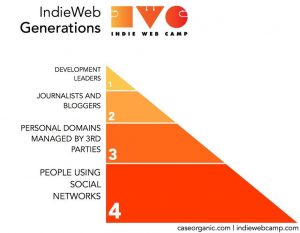
IndieWeb Generations Diagram by Amber Case (Caseorganic.com) as depicted on the IndieWeb Wiki
Over the past year, surely I’ve read, written about, or interacted with the IndieWeb community concretely in one way or another on at least 70 days. This sprint of 30 days should round out a 100 days project. To be honest, I haven’t necessarily posted about each of these interactions on my own site nor are they necessarily visible changes to my site, so it may not follow the exact requirements of the 100 Days of IndieWeb, but it follows the spirit of the creator idea with the hopes that the publicly visible result is ever more people adopting the principles of the movement for themselves.
I’ll focus the book primarily on how the average person can utilize the wealth of off-the-shelf tools of the WordPress content management system and its community–naturally with mentions of other easy-to-use platforms like Known and Micro.blog sprinkled throughout–to own their own domain, own their content, and better and more freely communicate with others online.
If you haven’t heard about the movement before, I’ll direct you to my article An Introduction to the IndieWeb, portions of which will surely inform the introduction of the book.
If you’ve recently joined the IndieWeb, I’d certainly love to hear your thoughts and stories about how you came to it, why you joined, and what the most troublesome parts have been so I can help direct people through them more easily–at least until there are a plurality of one-click solutions to let everyone IndieWeb-ify themselves online.
As a publisher who realizes the value of starting a PR campaign to support the resultant book, I’m also curious to hear thoughts about potentially launching a crowdfunding campaign to support the modest costs of the book, with profits (if any) going toward supporting the IndieWeb community.
I’m happy to entertain any other thoughts or considerations people have, so feel free to reply in the comments below, or better yet, reply on your own site and send me a webmention.
I originally made this compilation on May 31, 2016 to share with some friends and never got around to posting it. Now that I’m actually in the midst of a class on the topic, I thought I’d dust it off and finally publish it for those who are interested.
If you’re aware of things I’ve missed, or which have appeared since, please do let me know in the comments.
A List of video lectures for Algebraic Geometry
Harpreet Bedi (YouTube) 68 lectures (Note: His website also has some other good lectures on Galois Theory and Algebraic Topology)
Apparently the forest fire started around 4 am on Mount Wilson and has been burning relatively steadily since.
View of the Wilson Fire from East Pasadena on Woodbury.
Mount Wilson from Woodbury and El Molino in Pasadena
Mount Wilson from New York Blvd.
View of the fire at 8:54am from my back yard. (It’s more difficult to see from here despite it being far closer.)
Wilson fire at 8:54am from my front yard. It’s originating just behind the peak behind the palm tree.
I’ve got a great view from my office window of helicopter water drops.
This isn’t the closest fire to the house–that award goes to a medium sized brush fire about 8 doors down when I lived on Adams Hill in 2012, which was out in just a few hours–but it is the closest and the largest thus far. While it would take me about 3.5 hours to hike to the location of the fire, it’s because it’s located on a mountain and would take some winding mountain paths as well as a 4,700 foot climb. Sadly, most everything between us and the fire is all dry brush.
Fortunately today it’s not as hot or as windy as it has been here for the past month. Typically the winds have been to the North West this month, which would potentially serve to protect the house. The fire isn’t very close to residential neighborhoods (ours is the closest though), but there is an estimated $500 million in infrastructure and assets at the top of the hill as it is the home of the Wilson Observatory as well as a multitude of broadcast equipment for all of the major LA television and several radio stations.
Since at least 9am, I’ve been seeing a rotation of at least three helicopters and a large plane (747?) doing water drops on the hillside to battle the fire. Some of the photos above have these aircraft visible.
I still vividly remember the massive Station Fire in this area from August 2009 that still stands as one of the nation’s largest and significantly threatened the Observatory at the top of the hill above us. I was in San Diego the day the fire started and still remember the massive pyrocumulus cloud that I could vividly see the entire drive back home to Los Angeles.
Sadly, site deaths (thanks FriendFeed) have not preserved the photos, but here are a few tweets almost a week apart about the original:
Pyrocumulus cloud overlooking my local grocery store this afternoon as result of Station Fire. [pic] http://ff.im/-7sVUb
4:00 am Fire reported
8:00 am 26 acres burning and 0% contained
9:00 am the blaze had burned about 30 acres and and was 5 percent contained, according to the U.S. Forest Service
4:00 pm No visible smoke apparent from the Pasadena side facing North, but the fire is still blazing
9:00 pm No visible fire from the Pasadena side still, but fire is still at 30 acres and 25% containment
What does this mean? My personal website both sends and accepts Webmentions, a platform independent “at mention” or @mention, including those from the fantastic, free service brid.gy which sends replies/comments, likes, reposts, and mentions to my site from silo services like Facebook, Twitter, Instagram, Google+, and even Flickr.
As I’ve long known, and as someone noted at least once on my site, some of these likes, replies, and mentions, which provide some interesting social interaction and social proof of a post’s interest, don’t always contribute to the actual value of the conversation. Now with this wonderful facepiling UI-feature, I’m able to concatenate these types of interactions into a smaller and more concentrated section at the bottom of a post’s comments section, so they’re still logged and available, but now they just aren’t as distracting to the rest of the conversation.
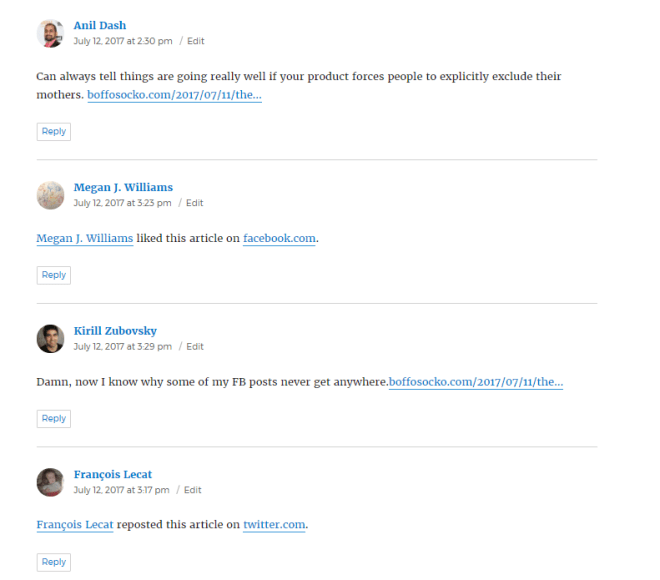
Compare the before and after:
Before
A mention, a Facebook like, another mention and a repost on Twitter. Anil’s comment is pretty useful, but the others don’t add as much to the ideas in the post.Richard MacManus “liked” the post and subsequently wrote about it on AltPlatform (relatively useful) along with some tangential mentions, which don’t add as much to the conversation. The raw URL of Gisele’s Twitter post likely looked better natively on Twitter (as a Twitter Card), but translated onto my site as a mention like this, just isn’t as useful.
After
Likes and Reposts concatenated on my site now after converting them into facepiles. They still give the social “proof” and indicate the interaction, but don’t interfere in the conversation now–especially when there are hundreds of them.
A Prime Example
In particular, this functionality can best bee seen on my article The Facebook Algorithm Mom Problem, which has over 400 such interactions which spanned pages and pages worth of likes, reposts, and mentions. Many of my posts only get a handful of these types of interactions, but this particular post back in July was overwhelmed with them when it floated to the top of Hacker News and nearly crippled my website. Without the facepile functionality, the comments section of this post was untenably unreadable and unusable. Now, with facepiles enabled, the comments are more quickly read and more useful to those who are interested in reading them while still keeping the intent.
Implementing
For those who have already begun Indiewebifying their WordPress sites with plugins like Webmention and Semantic Linkbacks, the most recent 3.5.0 update to Semantic Linkbacks has the functionality enabled by default. (Otherwise you can go to your administrative dashboard and click on the checkbox next to “Automatically embed facepile” located under Settings » Discussion).
Settings interface for enabling or disabling facepiles in your comments section with Semantic Linkbacks (and Webmentions)
As a caveat, there’s a known bug for those who are using JetPack to “Let readers use WordPress.com, Twitter, Facebook, or Google+ accounts to comment”. If the facepiles don’t show up on your site, just go to your JetPack settings (at yoursite.com/wp-admin/admin.php?page=jetpack#/discussion) and disable this feature. Hopefully, the JetPack team will have it fixed shortly.
If you haven’t begun using IndieWeb principles on your WordPress website, you might consider starting with my article An Introduction to the IndieWeb, which includes some motivation as well as some great resources for getting started.
Nota bene: I know many in the WordPress community are using the excellent theme Independent Publisher, which already separates out likes, mentions, etc. (though without the actual “facepiles”), so I’m not sure if/how this functionality may work in conjunction with it. If you know, please drop me a note.
Hopefully most WordPress themes will support it natively without any modifications, but users are encouraged to file issues on the plugin if they run across problems.
Using another platform?
I’m not immediately aware of many other CMSes or services that have this enabled easily out of the box, but I do know that Drew McLellan enabled it (along with Webmentions) in the Perch CMS back in July. Others who I’ve seen enabling this type of functionality are documented on the IndieWeb wiki in addition to Marty McGuire and Jeremy Keith, who has a modified version, somewhat like Independent Publisher’s, on his website.
There are certainly many in the IndieWeb community who can help you with this idea (and many others) in the IndieWeb’s online chat.
Give it a spin
Now that it’s enabled, if you’re reading it on my website, you can click on any of the syndicated copies listed below and like, retweet/repost, or mention this article in those social media platforms and your mention will get sent back to my post to be displayed almost as it would be on many of those platforms. Naturally comments or questions are encouraged to further the ongoing conversation, which should now also be much easier to read and interact with.
Thanks again to everyone in the IndieWeb community who are continually hacking away to allow more people to more easily own and control their content while still easily interacting with people on the internet.
UPDATE
Turning mentions into comments for native display
Following Aaron Davis’ comment, I thought I’d add a few more thoughts for those who have begun facepiling their likes, mentions, bookmarks, etc. As he indicates, it’s sometimes useful to call out a particular mention, a special like, or you might want to highlight one among the thousands for a particular reason. This is a feature that many are likely to want occasionally and code for it may be added in the future, but until then, one is left in the lurch a bit. Fortunately, as with all things IndieWeb, part of the point is having more control over your site to be able to do anything you’d like to it. So for those without the ability to write the requisite code to create a pull request against the Webmention or Semantic Linkbacks plugins (they’re more than welcome), here are a few quick cheats for converting that occasional (facepiled or not) webmention into a full comment within your WordPress site’s comment section.
Pro tip: This also works (even if you’re not using facepiles) to convert a basic mention into something that looks more like a native comment. It’s also useful when you’ve received a mention that you’d prefer to treat as a reply, but which wasn’t marked up as a reply by the sending site.
I’ll use an example from the Facebook Algorithm Mom Problem post referenced above. On that post, I’d received a webmention via Twitter from Anil Dash, a blogger and advocate for more humane, inclusive and ethical technology, with some commentary about usability. Here is his original tweet:
Can always tell things are going really well if your product forces people to explicitly exclude their mothers. https://t.co/lh41jVIU0E
That webmention is now hidden behind an avatar and not as likely to be seen by more casual readers. I’d like to change it from being hidden behind his avatar in that long mention list and highlight it a bit to make it appear as a comment in the full comments section.
On a post with a large number of mentions, you’re very unlikely to find some of the valuable nectar hiding in them. Do you see Anil Dash’s lovely mug hiding among all these avatars? (Hint, it’s not a “blank” avatar caused by someone having changed their Twitter, Facebook, etc. avatar.)
Steps to convert a mention to a comment
Caution: I recommend reading through all the steps before attempting this. You’ll be modifying your WordPress database manually, so please be careful so you don’t accidentally destroy your site. When doing things like this, it’s always a good idea to make a back up of your database just in case.
Search for the particular comment you want to change in the WordPress Admin UI.
Hover over the date in the “Submitted On” column to find the comment ID number in the URL, in this case it’s http://boffosocko.com/2017/07/11/the-facebook-algorithm-mom-problem/#comment-35281. Make a note of the comment ID: 35281.
Open up the mySQL database for your WordPress install (I’m using phpMyAdmin) to view the data for your site.
Go to the wp_comments table in the database. (Yours may be slightly different depending on how your site was set up, but it should contain the word “comments”.)
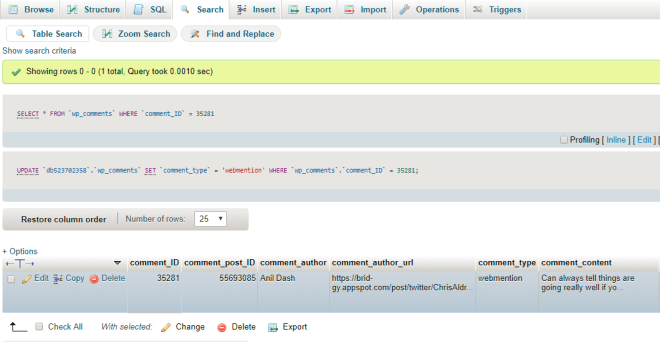
Use the search functionality for your table and input your comment ID number into the field for comment_ID.
We’ve identified the specific comment we want to modify in phpMyAdmin.
Now delete the word “webmention” from the comment_type field for the particular comment. This field should now be empty.
You should now be able to view your post (be sure to clear your cache if necessary) and see the mention you received displayed as a native comment instead of a mention. It should automatically include the text of the particular mention you needed.
Here’s what the modified mention from Anil Dash looks like in my comments section now. It appears as if it were a native comment.
If you need to convert a large number of mentions into comments, you may be better off searching for the particular post’s post_ID in the comments table and changing multiple comment_type fields at once. Be careful doing this in bulk–you may wish to do a database back up before making any changes to be on the safe side.
For those who are still on the fence about taking Algebraic Geometry this quarter (or the follow on course next quarter), here’s a downloadable copy of the written notes with linked audio that will allow you to sample the class:
I’ve previously written some notes about how to best access and use these types of notes in the past. Of particular note, one must download the .pdf file and open in a recent version of Adobe Acrobat to take advantage of the linked/embedded audio file. (Trust me, it’s worth doing as it will be like you were there with the 20 of us who showed up last night!)
For those who prefer just the audio files separately, they can be listened to here, or downloaded.
In the cold opening of Cheers, Season 9, Episode 23 “Carla Loves Clavin” aired on March 21, 1991, Norm Peterson (portrayed by George Wendt) invents the original definition of what would ultimately be adopted as the iconic symbol for Bitcoin. Interestingly at the time it didn’t stand for digital currency, but a more familiar liquid one.
Norm: Okay Rebecca. Um. Here’s the deal, I’ll paint the whole office including woodwork, and uh, it’ll run you 400. Rebecca: 400 bucks sounds reasonable. Norm: Oh no, that’s 400 beers, the B with the slanty line through it, it’s kinda my own special currency.
Norm invents the definition of the letter B with a slash through it. Hint: It doesn’t mean Bitcoin.
Within the broader social media world there are a huge variety of types of posts. These range from common articles to status updates to likes or favorites to more varied post types like photos, bookmarks, RSVPs, checkins, videos, reviews, jams, reads, audio, exercise, food, recipes, and even an exotic and rare chicken post type. While this list barely scratches the surface, the IndieWeb wiki has an almost exhaustive list along with examples.
Many social platforms sub-specialize in only one specific post type while others provide support for multiple types. Here are some common examples:
Twitter: status updates
Instagram: photos, videos
Facebook: status updates, articles, photos, videos, links, events, life events, checkins, emotions
LinkedIn: status updates, articles, résumés
Tumblr: text, photo, quote, link, chat, audio and video
Swarm/FourSquare: checkins
Last.fm: listens (aka scrobbles)
Pinboard: bookmarks
GoodReads: reads
Wouldn’t it be better to have a single personal website where you could post all these types of content easily and quickly?!
For a few years now, I’ve been posting these and many other types of posts on my personal website. When it’s appropriate I crosspost many of them to the social media silos that support these types so that friends, family, and colleagues can subscribe to them in the way that’s easiest for them.
Post Kinds Plugin
The simple meta box the Post Kinds Plugin displays for choosing what kind of post one is creating.
The Post Kinds Plugin for WordPress attempts to make it much easier to create customized displays for and format each of these types of posts (and many more). It leverages the flexibility and power of WordPress to be your single social media hub while, along with other IndieWeb friendly plugins, still allowing you to interact with other social networks.
Post Kinds Plugin not only indicates in the metadata what each post type is, but provides each post with some contextualization as well as the appropriate microformats classes to make it easier for other sites or parsers to interpret these posts. In short it helps to make status updates look like status updates; favorites appear like favorites; (schnozzberrys look like schnozzberrys); and RSVPs look like RSVPs in keeping with common user interfaces on many social platforms. (And in case you didn’t know, you can now post an RSVP on your own website and send a notification to posts elsewhere on the web of your intention!)
Post Kinds Plugin is different from WordPress’s Post Formats functionality
This sounds a little bit like the WordPress theme specific functionality of Post Formats, doesn’t it? Yes and resoundingly no!
Post Formats was a WordPress feature introduced in version 3.1, ostensibly to compete with other social platforms like Tumblr which offers the explicit post types of text, photo, quote, link, chat, audio and video.
The interface for choosing particular post types from within Tumblr.WordPress Post Format meta box with all of the available post types. Note that it’s far more limited than the options for Post Kinds.
Within WordPress, post formats are available for users to choose from if the theme enables support for them. And typically if they do support them they often provide specific display outputs and CSS styling that are controlled by the theme, often to make them look like what users have come to expect these post types to look like on other social media platforms. As an example, a “Status” post would typically display a short update which doesn’t include a title. Each theme that supports post formats chooses which ones they support, how to display them, and they can vary quite a bit from one theme to the next.
Below is the list of the nine supported formats with brief descriptions of their purpose taken from the WordPress codex:
aside – Typically styled without a title. Similar to a Facebook note update.
gallery – A gallery of images. Post will likely contain a gallery shortcode and will have image attachments.
link – A link to another site. Themes may wish to use the first <a href=” “> tag in the post content as the external link for that post. An alternative approach could be if the post consists only of a URL, then that will be the URL and the title (post_title) will be the name attached to the anchor for it.
image – A single image. The first <img /> tag in the post could be considered the image. Alternatively, if the post consists only of a URL, that will be the image URL and the title of the post (post_title) will be the title attribute for the image.
quote – A quotation. Probably will contain a blockquote holding the quote content. Alternatively, the quote may be just the content, with the source/author being the title.
status – A short status update, similar to a Twitter status update.
video – A single video or video playlist. The first <video width=”300″ height=”150″> tag or object/embed in the post content could be considered the video. Alternatively, if the post consists only of a URL, that will be the video URL. May also contain the video as an attachment to the post, if video support is enabled on the blog (like via a plugin).
audio – An audio file or playlist. Could be used for Podcasting.
chat – A chat transcript
There is anecdotal evidence that the WordPress Post Format functionality is slowly falling out of favor and there hasn’t been much, if any, change in how the feature works in the past several years.
The Post Kinds Plugin in many respects picks up where Post Formats left off, extends them significantly, and also builds a stronger platform for more modern website to website interactions.
Plugin Display
The Post Kinds Plugin out of the box generally does an excellent job of styling with some generic CSS to make these various post types look and behave as one expects without any changes or modifications to one’s theme. However, designers are more than welcome to either customize their CSS to their hearts’ content, or, if they prefer, they can manually code specific template views to override the plugin’s original views within their theme or child theme. To do this the plugin looks for a subfolder (or directory) within the theme entitled kind_views and uses those templates instead.
Microformats
Because, in part, the Post Kinds Plugin is designed for use with IndieWeb philosophies in mind, it has built in microformats support. What are microformats? They’re simple semantic classes added to the HTML of one’s site that allow parsers or other programs to read the data on your posts and pages to provide extended or increased functionality. WordPress’s core functionality already includes some microformats version 1 support; Post Kinds Plugin extends this quite a bit and uses the more modern version 2 specifications. Because Post Kinds takes care of these additional microformats, some older themes will have a leg up in the IndieWeb space despite having either limited or no theme support.
As an example using the reply post kind, the context from the site for which the particular post is actually a reply to is wrapped with the semantic class “p-in-reply-to”. As an example of the extended functionality provided by microformats, if one is using the Webmentions Plugin to send a webmention to the post that is being replied to, that remote site can parse the reply and display it properly as a reply in their comments section. (For WordPress sites receiving these webmentions, they can utilize the parser built into the Semantic Linkbacks Plugin.)
Similarly, bookmarklets, feed readers, or other programs could utilize these microformats and the data on your page to create customized views and displays.
Plugin Installation and Configuration
Installation of the plugin is relatively straightforward. From the Plugin tab in the WordPress admin interface, one can click the Add New button at the top of the page and either search for the plugin within the repository and install and activate it, or they can use the Upload Plugin button and install it from a prior download from either the WordPress repository or from the GitHub repository.
Options for installing the Post Kinds Plugin from the administrative interface within WordPress.
Configuration can be done from the Settings tab within the WordPress admin interface or, if the IndieWeb Plugin is installed, the settings can be found under IndieWeb » Post Kinds tabs in the admin interface.
Within the settings you can choose the post kinds you wish to enable on a particular site–not all sites will necessarily need or even want all types. I recommend only enabling the specific kinds you will actively be using; you can always come back and add additional types in the future. Some types may be enabled by other specific plugins that work in conjunction with Post Kinds Plugin.
Post Kinds Settings Click the appropriate check boxes for the kinds of posts you’d like to enable on your personal website.
Not having a post kind enabled will not disable the functionality on existing posts, it only hides the selection in adding new posts. This way if you enable favorites as a type and only use it a few times before deciding to disable it, the old posts will still exist and display properly.
You can also enable a Default Kind for New Posts. Most people will likely choose Article which is the default, but if your site is primarily used like a microblog for short status updates, then obviously Note may be your best default. Are you building a linkblog? Then you could enable the Bookmark kind.
How to use Post Kinds in practice
So how does this all actually work for creating posts?
Let’s start with a simple example. Let’s say I read a lot online and I’d like to have a linkblog of all of the articles I read. Let’s say I’m reading the article Lyme Disease’s Worst Enemy? It Might Be Foxesin the New York Times. I’d like to start out by creating a read post to indicate to those following me that I’ve read this particular article.
While I could do it manually, typically I’ll use a custom bookmarklet (more on how to do this shortly), which I click on in my browser bar as I read the article. The bookmarklet will create a new WordPress post and automatically fill in the URL of the article into the “Post Properties” metabox created by the Post Kinds Plugin in the admin UI of my WordPress site.
The Post Properties meta box in the administrative user interface in WordPress. The URL for the post can be either automatically included or manually filled in.
Then, I will click on the blue Retrieve button (pictured above) just under the post’s URL. The Post Kinds Plugin will parse the New York Times article page for either explicit metadata or Open Graph data to fill in some context about the article I’m reading in the Post Properties meta box. The main tab will autofill with the Name/Title of the article, a Summary/Quote of the article, and Tags if available. Similarly the other tabs in the Post Properties meta box including Details, Author, and Other will fill in with any available metadata about the Lyme disease post I’m reading.
In this particular example, the Times didn’t do a good job on the author data, so I’ll go to that tab and manually cut/paste the author’s name into the Author/Artist Name field, their URL into the Author/Artist URL field, and (optionally) the URL for their photo image as well. If other fields are improperly filled out or you would like to change them, one can manually adjust them if necessary. Not all kinds need (or show) all theses metadata fields when they’re ultimately published.
After retrieving the metadata most of the appropriate fields in the Post Properties box should be filled out. Here we see the “Main” tab filled in.The Details tab of the Post Properties meta box.The Author tab of the Post Properties meta box.
The retrieve button will also attempt to fill in an appropriate post Title into the posts’ field for that, but it can be modified manually if necessary. On many post kinds, though one may fill in an explicit (traditional WordPress post) title, it may not display on the final post because an explicit title isn’t really needed and the Post Kinds Plugin won’t display it. The note kind is a particular example of this behaviour.
Now that the contextual part of the post I’m reading is handled, I can, if I choose, add any notes, quotes, thoughts, or other personal data about what I’ve read into the main text box for the particular post.
The bookmarklet should have automatically set the post kind selector in the Kind metabox to Read and, if available, the older WordPress post format to link. (These can be changed or overridden manually if necessary.) Post Kinds does its best to properly and appropriately map Post Kinds to Post Formats, but the relationship isn’t always necessarily one-to-one and there are obviously many more kinds available than there are post formats.
Finally, the article can be published (unless you want to add any additional metadata to your post for other plugins or needs.)
Now I can also go to the URL of my personal site at http://example.com/kind/read/ where I can find an archive of this and all the posts I’ve read in the past.
A screen capture of what the final “Read” post looks like on my site. (Note that it may look slightly different depending on your theme and other customizations.)
Other post kinds work relatively similarly, though some may take advantage of other appropriate metadata fields in the Post Property meta box. (For example RSVPs use the RSVP dropdown field within the Other tab in the Post Property box.)
Custom feeds for Post Kinds
For sites adding lots of different post kinds all at once, the extra possible “noise” in one’s RSS feeds may have the potential to turn a site’s subscriber’s off. Fortunately the plugin also has custom RSS feeds for each of the particular post kinds which follows a particular format. As an example, the RSS feed for all the posts marked as “Note”, could be found at either the URL http://www.example.com/kind/note/feed
or http://www.example.com/feed/?kind=note (if one doesn’t have pretty permalinks enabled). Other feeds can be obtained by replacing “note” with the base names of the other kinds (reply, article, etc.).
Archive Displays
Post Kinds Plugin also handles the display of archives for individual post kinds. To view all the posts marked as notes, for example, one could visit the URL http://www.YOURSITE.COM/kind/note/. Simply replace YOURSITE.COM with your particular site name and the particular post kind name to access the others. In some areas of the social media world, this particular archive display of notes might be considered a personal Twitter-like microblog.
Bookmarklet Configuration
For Post Kinds Plugin users who like the simplicity and ease of use of bookmarklets, one can add ?kindurl=URL to their post editor URL and it will automatically fill this into the URL box in post properties. Adding ?&kind=like to the post editor URL will automatically set the kind.
As a full example, the URL pattern https://www.example.com/wp-admin/post-new.php?kindurl=URL&kind=like will automatically create a new post, set the post kind as like and auto-import the permalink URL for the page into the URL field of the Post Properties meta box.
The following code could also be used as a template to create a full set of browser bookmarklets. (Keep in mind the base URL example.com will need to be changed to the base URL of your personal site for it to work properly. One would also change the word bookmark in the code to any of the other types.)
Now that we’ve seen a few examples and gotten things set up, let’s take a brief look at all of the Post Kinds that are available. To make things a bit easier, we’ll break them up into four groups based on some shared qualities.
The Non-Response Kinds
These kinds have an analog in WordPress’s original post formats. Adding context to one of these may make it a passive kind.
Article – traditional long form content – a post with an explicit post title
Note – short content or status update – a post with just plain content and usually without an explicit post title
Photo – a post with an embedded image as its primary focus. This uses either the featured image or attached images depending on the theme.
Video – a post with an embedded video as its primary focus
Audio – a post with an embedded sound file as its primary focus
The Response Kinds
Response kinds differ from the non-response in that they are usually intended to be interactions with other external sites. For the best experience and improved functionality with these post kinds, it is recommended, but not required, that one have the Webmentions and the Semantic Linkbacks Plugins installed and activated. Doing so will send notifications of the replies and other interactions to those external sites which often display them. (These help your site work just like replies and mentions do on many other social media platforms, they just do so in distributed ways, so that neither you nor your friends necessarily need to be on the same platform or content management system to communicate.)
Reply – used for replying to someone else’s post
Repost – a complete repost of someone else’s content
Like – compliments to the original post/poster
Favorite – content which is special to the favoriter
Bookmark – this is basically sharing/storing a link/bookmark.
Quote – quoted content
RSVP – a specific type of reply regarding attendance of an event
The Passive Kinds
To “Scrobble” a song is to make a related post on your website when listening to it. This is the most well-known example of a passive kind of post. These kinds are formed by having content in the context box on one of these types of posts.
Listen – scrobble – listening to an audio post
Jam – Indicates a specific personally meaningful song
Watch – watching a video
Play – playing a game
Read – reading a book, magazine, or other online material
Reserved Kinds
The following kinds are reserved for future use within the plugin but will not currently show up in the interface unless enabled directly within the code. In some cases, these kinds don’t have the appropriate metadata fields within the plugin to make them user friendly without significant work.
Wish – a post indicating a desire/wish. The archive of all of these posts would be a wishlist, such as a wedding, birthday, or gift registry.
Weather – a weather post would be about current weather conditions
Exercise – represents some form of physical activity
Trip – represents a trip or journey and would require location awareness
Itinerary – refers to scheduled transit, plane, train, etc. and does not generally require location awareness
Check-In – identifying you are at a place. This would use the extended WordPress Geodata. It will require the Simple Location Plugin or something equivalent to add location awareness to posts. Some people are beginning to use this with the OwnYourSwarm application, which may require further configuration of your site to work properly.
Tag – allows you to tag a post as being of a specific tag, or person tagging.
Eat – for recording what you eat, perhaps for a food diary
Drink – similar to Eat, but for beverages
Follow – a post indicating you are now following someone’s activities (online)
Mood – feelings or emotions you’re having at the time of posting
Recipe – ingredients and directions for preparing food or other items
Issue – an article post that is typically a reply to some source code, though potentially anything at a source control repository
Event – a post kind that in addition to a post name (event title) has a start datetime, (likely an end datetime), and a location.
Additional Examples
If you’re reading this on my personal website, you can click on and view a variety of these post kinds described above to give you an idea of what they look like (and how they function with respect to Webmentions and other IndieWeb functionalities).
I’ve tried to cover as much of the basics of the plugin and provide some examples and screenshots to make things easier, but as always, there are ways to do additional custom configuration under the hood. I’m sure there are also off-label uses of the plugin to get it to do things the creator didn’t intend.
For additional details, one is certainly encouraged to skim through the code. If you have specific questions or problems, you can usually find the developer of the plugin and many of its users in the IndieWeb chat (web chat, IRC, Slack, etc.) for possible real-time help or support, or you can post questions or issues at the GitHub repo for the project.
Thanks
Special thanks to David Shanske for creating and doing a stellar job of maintaining the Post Kinds Plugin. Additional thanks to those in the IndieWeb community who continue to refine and revise the principles and methods which make it constantly easier for people to better own and control their social lives online by owning their own websites and data.
Whether you’re starting a blog, building your personal brand, posting a resume, promoting a hobby, writing a personal journal, creating an online commonplace book, sharing photos or content with friends, family, or colleagues, writing reviews, sharing recipes, podcasting, or any one of the thousand other things people do online it all starts with having a presence and an identity online.
The seemingly difficult task these days is deciding where that should be. There’s Twitter for sharing short updates and bookmarks to articles; Instagram, Snapchat, Flickr, and YouTube for photos and videos; Facebook for communicating with family and friends; LinkedIn for work and career related posts; Swarm for sharing your location; and literally thousands of others for nearly every micro-slice of content one could think of.
Can you possibly be on them all? Should you? Would you want to be? Could you keep up with it? Which one really and truly represents the real you? Could any of them?
And what about your friends, family, and potential audience for all of these things? Some will be on Twitter while others only use Facebook. Grandma is worried about privacy and is only on Instagram to see photos of the grandchildren. Mom is on Facebook because she thinks that’s what the internet is, and wants to like everything her children post. Teenagers don’t want to be on any platforms their parents have heard of. It’s obvious that everyone has their own preferences and favorites.
In short, the web and using it for easy communication has become fraught with fragmentation and walls that often make communicating online far more difficult than it should be. Wouldn’t it be better if you had a single website that represented you online and through which you could easily communicate with everyone?
By analogy consider the telephone system which, just like the internet, consists of wires and hardware to access the network. Every user on the network has their own phone and phone number. What would it be like if AT&T users could only speak to other AT&T users and needed another separate phone, account, and phone number to speak to friends and family on Verizon and yet another to talk to friends on Sprint? To a great extent, this is what the internet has evolved to become with monopolistic, for-profit, corporate services like Facebook/Instagram, Twitter, LinkedIn, and all the rest.
Is there a better and more robust solution than these multitudes of social media sites which all come with their own onerous terms of service, limitations on your creativity, reach, ownership, and control of your online identity?
A growing number of people on the web are sure there is and they’re working together in an open yet coordinated way to improve the democratized nature of the decentralized internet. This movement is known as the IndieWeb.
Purpose of IndieWeb
The purpose of the IndieWeb movement is to help put you in control of your web presence, allow you a more true sense of ownership of your content, and to allow you to be better connected to your friends, family, colleagues, and communities. By first owning your own domain name and having your own personal website, the IndieWeb aims to help facilitate the following:
You are in Control
You can post anything you want, in any format you want, with no one monitoring you. In addition, you share simple readable links such as http://www.example.com/ideas. These links are permanent and will always work.
Control and Freedom
You should be able to exercise your freedom of speech and publish anything you want whenever you want. You should be able to set your own rules and own limits. You should be able to post content as long or short as you like with no pre-imposed limits or types whether it be text, photos, audio, or video. You should be able to have control over comments and protection against potential harassment, bullying, and online trolls.
Identity & Identity loss
Almost every social media site has a multi-page statement of their terms of service written in complicated legalese. More often that not, these terms are to protect them and not you. As a result people have found their accounts frozen, they’ve been shut out with no notice or warning, their identities have been reassigned, or their content simply disappears with little or even no notice. Often there is either no method of recourse, or it is difficult to communicate with these corporations and may take weeks or worse to recover one’s account and data, if at all.
Without care, one can become branded with the identity of the social media network of which they’re a part. If trolls overrun your social service then suddenly by association, you’ve become one too.
User Interface/User EXperience
You should have the ability to control how your site looks and works. Do you want a piece of functionality that one of your social network sites doesn’t have? Add it the way you want it. Create better navigation, better interactivity, better design to reflect your own identity instead of a corporation’s cookie-cutter idea of your identity. Since your data is yours you can add new and interesting pieces of functionality using that data instead of waiting on a social site to think about it and implement it for you. Chances are that unless millions will find it valuable or a company doesn’t think it will scale, most won’t build it, so don’t hold your breath.
Your content is yours
When you post something on the web, it should belong to you, not a corporation. Too many companies have gone out of business and lost all of their users’ data. By joining the IndieWeb, your content stays yours and in your control.
Greater reliability and protection against content loss
Social media is only about 11 years old, and one thing is certainly true: sites will go out of business, they will get acquired, they can and willdisappear. When this happens, your data can disappear overnight without the ability to back it up or export it. A new corporation can take over and change the terms of service and do things with your data that you never intended. Content can accidentally or even willfully disappear without notice to you. In addition to the data, you can also lose contact with family, friends, and community members that also disappear without the service that connected you to them.
You can have greater control of site downtimes, server outages, maintenance, scalability issues, and database failures of silos attempting to solve massive scaling/engineering problems.
A better sense of ownership
Many in the IndieWeb community have found that they post more interesting and thoughtful pieces of content when they’re doing it on their own site rather than the “throw away” content they used to post to sites like Twitter. They feel a greater sense of responsibility and ownership in what they’re posting about and this can have a profound effect on the future of the internet and its level of civility.
Author centric
When you own your own website, other web sites see that it’s you personally sending traffic to their sites instead of a generic social site. You have the ability to edit content at any time or delete it if you like.
You also have:
greater choice of public vs. private posts and control of who your audience is;
the ability to fix URL links when they break or disappear;
no outside advertising on your site without your explicit permission;
no one monetizing you;
no censorship of your content;
no terms of service which can often co-op your work without notice for advertising or other use;
ownership and control of affiliate links to monetize your work if you choose.
You are better connected
Your articles and status messages can go to all services, not just one, allowing you to engage with everyone regardless of their choice of platform. Even replies and likes on other services can come back to your site so they’re all in one place.
Since your content isn’t hidden behind the robots.txt of a silo service, you have much better search engine rankings and are more likely to be found, read, or have people interact with your content. If you choose, you can still syndicate your content to one or more social silos while still owning your content in the case that something happens to those silos. This allows you to continue to reach your friends, family, colleagues, and community who may have different ideas about where they prefer to interact online. Comments to and interactions with your content can come back to your original post to create a comprehensive conversation rather than have your conversation disjointed and spread over dozens of sites throughout the web.
How to be a part of the IndieWeb
Now that you’ve got a bit of an idea about what the IndieWeb movement is attempting to help people accomplish, how can you become a part of it and enjoy the benefits for yourself?
Own and use your own domain name
Fifteen or more years ago having your own domain wasn’t as easy or as inexpensive as it is now. There are hundreds and hundreds of domain registrars around the world that can register almost any domain name you can come up with for as little as 99 cents a year with the average closer to the $10-20 range depending on the name and the top level domain (.com, .org, .net, and .edu are examples of top level domains.)
For an extra $0-10 a month you can quickly purchase domain hosting so that when someone visits your fancy URL, it actually connects to a page on the internet. Whether that page is a single page of simple HTML with a line of text and a photo; a plug and play site like Wix or SquareSpace; a full blown professional open source content management system like WordPress or Drupal; a web site you build by hand using your own code; or it points to your Facebook or Twitter account page, you’ve just made a huge step toward better cementing your identity on the internet.
Once you own your own domain name, everything you post to the web will have a permalink URL which you can control. If you wish to change platforms or service providers you can relatively easily move all of your content and the permalinks along with it–much the same way you can move your cell phone number from one provider to another. People who visit your URLs will always be able to find you and your content.
Twitter account profile asking for your name, bio, location, and your personal domain name/URL online.
If nothing else, owning your own domain name will give you something useful to put into the ubiquitous field labeled “your website” that exists on literally every social media website out there. (Even they are subtly telling you that you should have your own domain name.)
Added bonus: even most inexpensive domain registrars and hosting services will give you free email for your domain so you can create a custom branded personal email address like susan@yourname.com. Even if you rely on G-mail or some other third party service for your email, it’s pretty easy to connect your own personal email address to your pre-existing account. It’ll make you look a lot more professional and will be far easier for your friends, family, and business colleagues to remember.
So you own your domain now?! Congratulations, you are officially a full-fledged member of the IndieWeb!
Own your data
Wait, it can’t be that simple can it? It is! But now that you’ve got your own website, it’s time to start using it to own your online identity and own your own content.
Next you may want to choose a content management system (CMS) in which to store and present your data. The IndieWeb has lists of projects which range from common services as simple as Tumblr and WordPress.com (both managed services with free hosting) to help in building your own site from the ground up in your programming language of choice. Which project you choose depends on your needs, desires for the future, and your abilities. There is something available for people of nearly every level of ability. Most domain registrars and internet host providers provide one or more means to quickly get up and running–just ask their customer service departments or see what they’ve got available online.
Most of these CMS solutions will give people a far bigger range of flexibility in terms of what they can write, record, and broadcast online. You don’t need to be limited to 140 characters if you choose not to be. Want to post more multi-media-based content with text, video, audio, and photos all at once? The online world can be your oyster and your social media platform no longer limits what is possible.
Further Steps
Ideally, what a lot of the IndieWeb developer community is rapidly building and iterating upon is an open and broadly distributeable way to make it easier for the everyday person to more easily own and operate all the functionality offered by the hundreds of social media websites without a lot of heavy and difficult-to-maintain overhead. A decade ago allowing Facebook to do everything for you may have been a simple “way out”, but now there are far more robust, diverse, and flexible solutions that aren’t as onerous. There are also newer open and easily supportable web protocols that make publishing and sharing your content far easier than before.
The first big piece most people enjoy implementing is writing their own content on their own site and syndicating it out to other services on the internet if they choose. Continuing to participate in your old siloed networks can help you stay connected to your pre-existing social networks, so you’re not leaving all your friends and family behind. Next, having all your replies/comments, likes, and other interactions come back from social silos to your own site as comments along with notifications is incredibly valuable. (These two processes are commonly known as Post On your Own Site, Syndicate Elsewhere (POSSE) and backfeed, and they can typically be done most easily with a free service like Brid.gy.)
Being able to write replies to articles or status updates on your own website and either @mentioning others as a means of notifying them is also very useful. The IndieWeb calls this universal implementation of @mentions that work across website boundaries Webmention and it’s built on an open and straightforward standard so that it can work with any website on the internet. (Remember the telephone analogy above? Now, thanks to Webmentions, everyone can be communicating on the same network.) As an example, imagine for a moment if you could @mention someone on Facebook from Twitter or vice-versa?! What if you could post a reply to a tweet on Twitter with your Facebook account?Using the Webmention spec, independent websites can easily do this now, though it may be quite a while before for-profit corporations support this simple protocol that is now a W3C recommendation.
With some of the basic building blocks out of the way, people tend to spread out a bit in the types of functionalities they’re looking for. It may range from posting status updates, pictures, or video to hosting your own podcast or or having different user interfaces to post to your own site–Micropub is great for this–to being able to put events on your site and allowing people to RSVP to them easily. Wouldn’t it be nice if you could post an event on your own website and people could use Facebook to RSVP to it? My site allows this possibility. Yours could too.
Everyone’s desires and needs will be different. Work on what you find most interesting and useful first (the IndieWeb calls these itches). Make a list of what you use most often on your old social media silos or wish they had and work on that first. Check out the IndieWeb wiki to see how others have implemented it–there’s no need to reinvent the wheel in darkness. Hop into the IndieWeb chat (there are multiple ways of doing this and interacting) and ask questions. Document what you’ve done in the wiki to make it easier for those who come after you.
Personally, I’ve always just thought about what functions do I use most on social sites and then ask myself how I might be able to do that on my own site. There’s little out there that hasn’t been explored by the bigger community, so searching the wiki for those types of functionality and seeing how others managed it usually makes it far easier. Chatting with folks in the community while I’m working always helps to sharpen my thinking and make me aware of ideas and methods I may have never considered much less come up with on my own.
If you never RSVP for things online or host events, then obviously don’t start there. Do you post photos regularly? Maybe you “like” everything you see online. In my case, I was a heavy user of Goodreads, so I spent parts of the last year working on more easily bookmarking things I’d like to read, posting reading status updates, and keeping notes on what I read, as well as highlights, marginalia, and book reviews after I’d finished reading.
Guiding Philosophy
The IndieWeb effort is different in several ways from previous efforts and communities. In particular it values principles over project-centrism. Other efforts have assumed a monoculture of one project as the ultimate solution for everyone. IndieWeb prefers developing a plurality of projects–why not have the same diversity on the web as we do in real life?
The community prefers chat in combination with a wiki to communicate and document its process. Some may prefer email distribution lists, but why? Who likes to read and respond to long email threads where information is typically locked away from the group, ignored, and simply unread? Instead, we utilize a chat (which has multiple methods of access–plurality, remember?) to host searchable conversations after which the best portions are documented on the wiki to be easily searchable and discoverable to all.
In the early days of social media, many talked, emailed and chatted about what they’d like to see. Sadly not much was done about expanding on these ideas, particularly by companies that all had their own profit-driven motives. As a result, the IndieWeb movement values showing before telling. They prioritize development by encouraging people to scratch their own itches, creating what they want to have and use on their own sites, and then iterating on those pieces to improve and refine them. If you won’t use a feature on your own site, why bother to have it?
IndieWeb puts design first and foremost. Protocols & formats come second. They’d prefer to focus on good user experience and user interaction. Users selfdogfood prototypes on their own sites to create minimum necessary formats & protocols.
Perhaps most importantly, the IndieWeb is people-focused instead of project-focused. The community is rich and diverse and has regular in-person meetups as well as camps across the world where everyone is welcome. The IndieWeb community is inclusive and has a code-of-conduct.
Join the IndieWeb Community
Where do I go from here? You said community in there. Where can I find it? How can I interact, get help, or even contribute back?
Regardless of your level of expertise, there are a huge number of resources, events, and even people available to you in a variety of formats. Whether you choose to meet with friends in person at IndieWebCamps or at regularly scheduled Homebrew Website Club meetups or interact online at a nearly continuous worldwide chat (using either web chat, Slack, Matrix, or IRC) there are many means of getting help and interacting to suit your schedule and needs to help build the personal website you’ve always wanted.
Building the indie web is a continuous process. While attending an IndieWebCamp can be an incredibly inspiring and encouraging event, we need to carry on doing so for more than just a few days a year when we can meet up in real life. We can not only support one another; we can share the best way to do things online. As we discover new ways of doing things, we can document them and share them easily with each other and the growing community.
If you’ve made it this far, I invite you to join us, and get started building the internet you’ve always wanted by building your home on the web first.
Editor’s Note: As of December 2017, the AltPlatform.org site which originally published this article has shut down. I’ve smartly kept a private archived copy of the original of this post here on my personal site and manually syndicated a copy of it to AltPlatform for just such a possibility. (Hooray for PASTA (Publish Anywhere, Save to (Private) Archive)!) As a result of the shutdown, I’m making the original public here.